Does Your Business Need Field Service Software? A 5-Question Test
A 5-question test for trades, cleaning, home care and delivery teams, a worked ROI example with every input shown, and when a spreadsheet is still enough.
You need field service software when coordinating the work starts costing more than the software does. For a small team that bar is low: at an assumed loaded cost of $35 an hour, a $49-a-month plan pays for itself if it saves 84 minutes a month, about four minutes a working day, or one wasted trip. That is a low bar when, by field technicians' own estimate in a 2025 Salesforce survey, 47% of appointments don't go according to schedule (Salesforce, 2025).
Not every business needs it today. Below: a five-question test that works for cleaning, home care and delivery as well as plumbing, a worked return-on-investment (ROI) example with every input labelled, and when a spreadsheet and a group text are enough.
The five-question test
Answer each question for the last four weeks, not for a typical week you remember fondly.
- Do you send two or more people to customer addresses on most days? One person can hold the day in their head; two on the road means someone has to track both.
- Does someone answer "when will they get here?" or chase staff for where they are more than once a day? Count calls and texts in both directions, whether the person waiting is a homeowner, a property manager or the family of a care client.
- Did at least one visit go wrong in a way better information would have prevented? Nobody home, a wrong address, a missing lockbox code, the wrong person sent.
- Does the day's schedule live in one person's head, phone or whiteboard? If the day falls apart when that person is off sick, the business runs on their memory.
- Do customers, clients or a contract ask you to prove when someone arrived and how long they stayed?
Scoring. Zero or one "yes": you can wait. Two or three: run a 30-day trial and measure it. Four or five: you are already paying for the lack of a system, in staff time instead of a subscription.
What does a wasted hour cost a service business?
A coordination tool is worth the time it saves times what that time costs. The U.S. Bureau of Labor Statistics (BLS) publishes median wages for the people these businesses send out. In its May 2025 survey (BLS, 2026):
- Trades: HVAC mechanics and installers earned a median of $29.33 an hour (BLS OOH), plumbers $30.67 (BLS OOH) and electricians $30.38 (BLS OOH).
- Cleaning and care: maids and housekeeping cleaners earned a median of $17.07 an hour, and home health and personal care aides $17.21 (BLS, 2026; BLS OOH).
- The office: dispatchers (other than police, fire and ambulance) earned a median of $24.20 an hour (BLS, 2026).
Wages are not the whole cost. In BLS's employer cost survey for June 2026, private-industry wages and salaries "accounted for 70.0 percent of employer costs," with benefits making up the other 30% (BLS, 2026). Dividing a median wage by 0.70 gives a rough loaded cost: about $41.90 an hour for an HVAC technician, $43.81 for a plumber, $34.57 for a dispatcher and $24.39 for a house cleaner. Vehicles, fuel and overhead push the true cost of a field hour higher still.
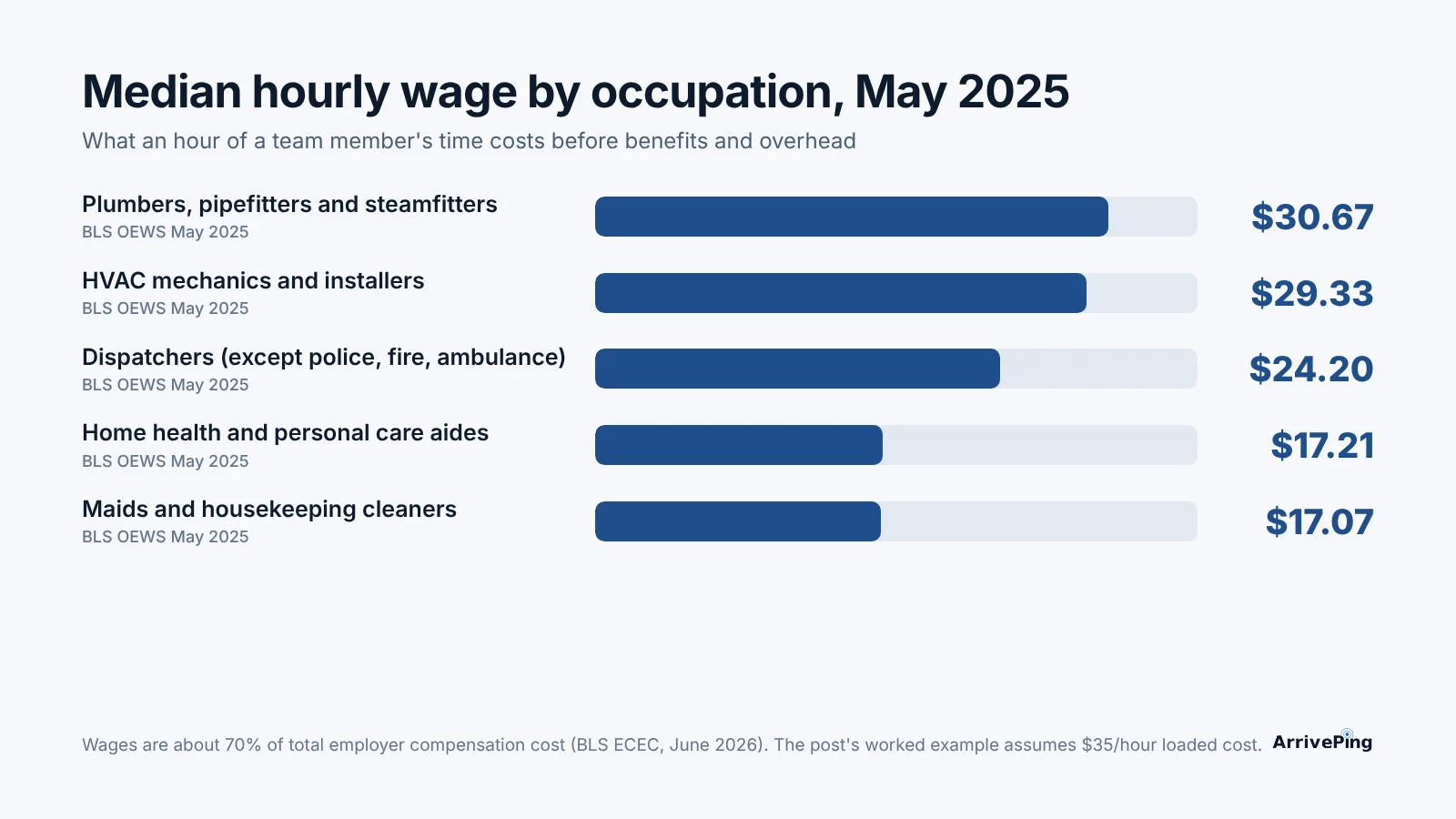
The example below uses $35 an hour as an assumption: below a tradesperson's loaded cost, close to a dispatcher's, above a cleaner's (shown separately).
Where the hours actually go
Coordination time is mostly invisible, because it arrives in two- and five-minute pieces.
- Schedules slip, constantly. Salesforce surveyed 350 U.S. tradespeople and technicians (including installation and repair workers and on-site medical care workers) in February and March 2025. They estimated that 47% of appointments don't go according to schedule, and 38% said schedules are often mishandled because of customer miscommunication, missing parts or not enough time allowed for the job or the drive (Salesforce, 2025).
- Each change costs minutes. The same respondents estimated it takes 17 minutes on average to make an appointment, 14 minutes to change one and 12 minutes to cancel one. They also estimated losing "more than seven hours per week" to low-value tasks such as manual data entry (Salesforce, 2025). These are self-reported estimates, not stopwatch readings.
- Customers notice the gaps. In Housecall Pro's survey of 1,040 U.S. homeowners in October 2025, 35% said late arrivals frustrate them and 59% expect text updates as the job progresses (Housecall Pro, 2025). Housecall Pro sells field service software, so read it as directional.
- Waiting costs the customer, too. In a 2011 IBOPE Zogby poll for TOA Technologies, Americans who waited for in-home appointments did so for an average of four and a half hours, and 50% used a sick or vacation day to do it. About 70% said they would recommend a company "simply because a representative was on time" (CNN Money, 2011). The study is old and vendor-commissioned; we covered what a missed visit costs in more detail in No call, no show.
Worked ROI example: a three-person team
Take an owner who dispatches from the office or the truck, plus two people in the field: exactly what ArrivePing's $49-a-month Starter plan covers (pricing). Every input is sourced or labelled as an assumption, so you can swap in your own.
| Input | Value | Where it comes from |
|---|---|---|
| Loaded cost of an hour of staff time | $35 | Assumption (BLS loaded estimates above range from $24 to $44) |
| Working days a month | 21 | Assumption |
| Software cost, owner + 2 technicians | $49 a month | ArrivePing Starter (pricing) |
| Software cost, owner + 3 technicians | $79 a month | Starter plus one technician license at $30 (pricing) |
| Office phone time saved | 10 minutes a day | Assumption, smaller than one 14-minute reschedule (Salesforce estimate) |
| Wasted trips avoided | 2 a month | Assumption |
| Time lost per wasted trip | 1 hour | Assumption: drive there, wait, drive on. Fuel and vehicle cost left out |
The arithmetic:
| Calculation | Result |
|---|---|
| Break-even at $49: $49 ÷ $35 an hour | 1.4 hours (84 minutes) a month, 4.0 minutes a working day |
| Break-even at $79: $79 ÷ $35 an hour | 2.26 hours (about 135 minutes) a month, 6.4 minutes a working day |
| Break-even for a cleaning team at $49: $49 ÷ $24.39 (BLS median $17.07 ÷ 0.70) | 2.0 hours (about 121 minutes) a month, 5.7 minutes a working day |
| Phone time saved: 10 minutes × 21 days = 3.5 hours × $35 | $122.50 a month |
| Wasted trips avoided: 2 × 1 hour × $35 | $70.00 a month |
| Total value in this example | $192.50 a month |
| Net after the $49 plan / after the $79 plan | $143.50 / $113.50 a month |
Two caveats. The saving only exists if the software changes what happens: if the phone still rings and trips are still wasted, the return is zero. And this counts only staff time; it leaves out the customer who rebooks because you were on time, and the time spent setting the system up, covered in how long it takes to set up field service software. For list prices at larger team sizes, see what field service software costs.
Decision table: now, later, or something else
| Signs you need it now | Signs you can wait | What to use instead | |
|---|---|---|---|
| Volume | Two or more people in the field most days, several stops each | One person, or a few long jobs a week | A shared calendar |
| Customer questions | Several "when will they arrive?" calls or texts a day | Customers rarely ask; visits are booked weeks ahead | A standard confirmation text sent by hand |
| Wasted visits | One or more a month from wrong addresses, missing codes or the wrong person | Almost none, because you see the same customers every week | Notes field in your calendar for codes and access |
| Who holds the schedule | One person's head, phone or whiteboard | Everyone can see one shared sheet and keeps it current | A shared spreadsheet with one row per visit |
| Proof of attendance | Clients or contracts ask for arrival times and time on site | Nobody asks | A photo with a timestamp sent to the group chat |
| Growth | Hiring your next field person within six months | Steady team size and no plans to change | Revisit the five questions in a quarter |
When a spreadsheet and a group text are enough
Plenty of good businesses run on a shared spreadsheet and a group chat, and they are right to. A solo operator, or two people working the same weekly route for the same customers, has nobody waiting at a window wondering when they will arrive. The spreadsheet is free, everyone knows how to use it, and the group text reaches everyone at once. It breaks at a predictable point: when no one can see the whole day at once, when the person keeping the sheet current is also driving, and when customers call to find out what the sheet already knows. Until then, keep your money.
Playbook: measure it this week
- Count the coordination calls. For five working days, tally every "where are you?" call or text to a field worker and every customer asking when someone will arrive.
- Log every wasted visit. Each trip that ended without the job done for lack of information.
- Time the reschedules. From the call to everyone knowing.
- Price your own hour. Take your real wage for the role, divide by 0.70 for a rough loaded cost, or use our $35 assumption.
- Do the break-even sum. Divide the monthly price of the plan you are considering by your hourly cost to get the hours it must save a month. Multiply each tally by the minutes it took; if one week's total comes to more than a quarter of those hours, the software is likely to pay for itself.
- Trial it against the same tallies. Run a month-long free trial with the same tally sheet, and compare numbers, not impressions.
- Show customers something useful. Whatever tool you choose, decide what the customer sees when someone is on the way; we break that down in what a customer tracking link should show.
How ArrivePing does this
ArrivePing is field service software made by NVC360 in Winnipeg, Manitoba. It began as a tool built for a specialty subcontractor running more than 800 field technicians, and now serves any business that sends people to customers, from trades to cleaning, delivery and property maintenance.
As field service management software, it shows your team on a live map from the phones they already carry, with no GPS hardware in the vehicles. As dispatch software, it ranks people by distance, matching skills, availability and workload, assigns the best fit or suggests it to a dispatcher, and sends the job to that person's phone. When they tap "on the way," the customer gets a text with a live tracking page and an ETA; if the day slips, a running-late notice goes out, and a geofence records arrival and starts the on-site clock. Starter is $49 a month for one dispatcher and two technician licenses; technicians 3 to 29 are $30 each, and a second office user is priced like a technician (pricing). There is a 30-day free trial with as many users as you like; a card is required, and nothing is charged until day 30.
When not to choose us. If you scored zero or one, you don't need us yet. If you want marketing campaigns or a sales pipeline in the same product, an all-in-one platform covers more of that. If you need engine diagnostics or driver-behaviour scoring, that is a telematics product. And ArrivePing doesn't include care plans or clinical records. In-home care, home nursing and healthcare-aide agencies are a strong fit for the scheduling side, which covers who visits whom, when they arrive and what the client and family are told. Keep care plans in the clinical system you already use.
FAQ
How do I know if my business needs field service software?
Answer five questions for the past month: do two or more people visit customers most days, does someone chase locations or answer "when will they arrive?" calls daily, did a visit go wrong for lack of information, does the schedule live in one person's head, and do clients ask for proof of arrival? Two or three yes answers justify a trial; four or five mean you already pay for the gap in staff time.
Is field service software worth it for a small business?
It is worth it when it saves more staff time than it costs. At an assumed loaded cost of $35 an hour, a $49-a-month plan breaks even at 84 minutes saved a month, about four minutes a working day. Count your coordination calls and wasted trips for one week to see whether you clear that bar.
Can cleaning, home care or delivery businesses use field service software?
Yes, if they send people to customer addresses; the problems are the same: who goes where, when they arrive and what the customer is told. In-home care, home nursing and healthcare-aide agencies fit especially well, because a client and their family want to know exactly when the caregiver will arrive. Because BLS median wages for cleaners ($17.07 an hour in May 2025) are lower than for trades, the break-even takes more saved time, about two hours a month on a $49 plan.
When is a spreadsheet good enough instead of field service software?
A shared spreadsheet and a group text are enough for a solo operator or a small team working fixed routes with regular customers who rarely ask when you will arrive. Switch when no one can see the whole day at once, the person keeping the sheet is also driving, or customers call to ask what the sheet already knows.
How much does field service software cost for a small team?
ArrivePing's Starter plan is $49 a month for one dispatcher and two technicians, and a third technician brings it to $79. Other vendors list entry plans at different prices and count users differently, so compare the total for your headcount rather than the headline price.
Sources
- U.S. Bureau of Labor Statistics. "Occupational Employment and Wages, May 2025" (news release). May 15, 2026. https://www.bls.gov/news.release/archives/ocwage_05152026.htm
- U.S. Bureau of Labor Statistics. "Heating, Air Conditioning, and Refrigeration Mechanics and Installers," Occupational Outlook Handbook. Checked November 1, 2026. https://www.bls.gov/OOH/installation-maintenance-and-repair/heating-air-conditioning-and-refrigeration-mechanics-and-installers.htm
- U.S. Bureau of Labor Statistics. "Plumbers, Pipefitters, and Steamfitters," Occupational Outlook Handbook. Checked November 1, 2026. https://www.bls.gov/ooh/construction-and-extraction/plumbers-pipefitters-and-steamfitters.htm
- U.S. Bureau of Labor Statistics. "Electricians," Occupational Outlook Handbook. Checked November 1, 2026. https://www.bls.gov/ooh/construction-and-extraction/electricians.htm
- U.S. Bureau of Labor Statistics. "Home Health and Personal Care Aides," Occupational Outlook Handbook. Checked November 1, 2026. https://www.bls.gov/ooh/healthcare/home-health-aides-and-personal-care-aides.htm
- U.S. Bureau of Labor Statistics. "Employer Costs for Employee Compensation, June 2026" (news release). September 9, 2026. https://www.bls.gov/news.release/archives/ecec_09092026.htm
- Salesforce. "Tradespeople, Techs Waste Nearly a Full Day's Work Weekly on Paperwork, 81% Think AI Agents Can Help" (survey of 350 U.S. tradespeople and technicians). April 9, 2025. https://www.salesforce.com/news/stories/field-service-agentic-ai-transformation/
- CNNMoney. Report on the TOA Technologies / IBOPE Zogby cost-of-waiting survey. November 3, 2011. https://money.cnn.com/2011/11/03/pf/cost_of_waiting/index.htm
- Housecall Pro. "The new home service standard: Why systems now win more customers" (survey of 1,040 U.S. homeowners, October 2025). December 10, 2025. https://www.housecallpro.com/resources/home-service-customer-service-report-trends-statistics/