

Electrical
Electrician dispatch software that sends the right license and keeps customers posted.
Match each call to a qualified, nearby tech, text customers a live ETA, and log arrival automatically on the phones your crew carries.
- Suggests by license, distance and workload
- Live ETA link, no customer app
- Arrival logged automatically within 150 m
Free for 30 days with as many users as you like, then from US$49 a month. Nothing is charged until day 30, and you can cancel any time.
Your technicians use the ArrivePing app for iPhone, iPad and Android.
Wolf Willow Electric: Your electrician Malik is on the way! ETA ~14 min. Track live, see ETA & message them: https://arriveping.com/t/7k2q9x
What should electrician dispatch software do?
Electrician dispatch software should match each call to a nearby, available electrician with the right license level, put no-power emergencies ahead of routine installs, and text the customer a live ETA once the electrician starts driving. It should log arrival and on-site time automatically and keep photos, readings and signatures with the job. ArrivePing does this on the phones your crew already carries, from US$49 a month.
Last updated
Why dispatch matters in electrical work
- 11 hrsof power interruptions per U.S. electricity customer in 2024, nearly twice the decade's averageU.S. Energy Information Administration, 2025 (opens in a new tab)
- 47%of appointments don't go according to schedule, field workers estimateSalesforce survey of 350 U.S. field workers, 2025 (opens in a new tab)
- 72,700electrician openings projected each year in the U.S.U.S. Bureau of Labor Statistics, 2026 (opens in a new tab)
Friday, 3:40 p.m., and a kitchen without power.
Text message from +1 (204) 555-0142: Wolf Willow Electric: Your electrician Malik is on the way! ETA ~14 min. Track live, see ETA & message them: https://arriveping.com/t/7k2q9x
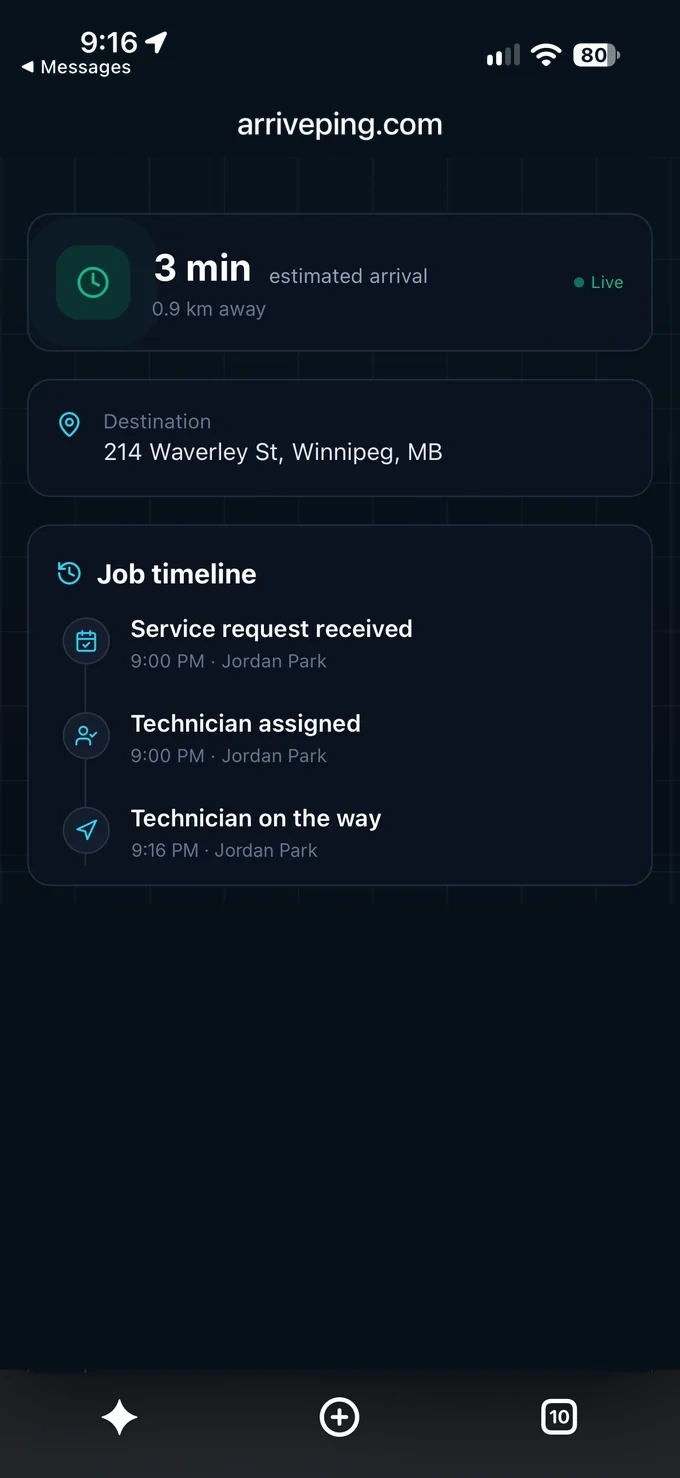
- 3:40 p.m.
The cooler goes quiet
Sam's pizzeria has lost its walk-in cooler and half the kitchen, and a breaker won't reset. Rosa opens an Emergency work order that requires “Journeyman, commercial,” notes “rear door, ask for Sam” and attaches the No-Power template.
- 3:44 p.m.
The right license, not just the closest
ArrivePing suggests Malik, a journeyman 5 km away, over Tyler, a closer apprentice who isn't tagged for solo commercial calls. Rosa confirms. Malik accepts and taps Start Driving, and Sam gets a text with Malik's name and an ETA of about 14 minutes.
- 4:04 p.m.
No calls to the office
Traffic adds six minutes, and Sam watches the ETA update instead of phoning. His message, “use the back lane,” stays on the job. Malik is checked in automatically within 150 m, and his location disappears from Sam's page.
- 4:46 p.m.
Fixed and documented
A failed two-pole breaker with a scorched lug. Malik fits a replacement priced from the catalog, logs the template's required readings and adds panel photos. Sam signs on Malik's phone, and Rosa sees 42 minutes on site.
Service calls, installs and outage days on one board.
- 01
License-aware assignment
Tag masters, journeymen, apprentices and EV or generator skills; require them so only qualified techs are suggested.
- 02
One queue for outage days
Unassigned no-power calls wait in one prioritized queue, so dispatch clears emergencies before routine installs.
- 03
Checklists that block shortcuts
Panel and EV templates can require readings and labelling before a job can be completed.
- 04
ETA without phone tag
Customers get the on-the-way text and a live page to call, text or message the tech. No app needed.
- 05
Proof for inspectors and owners
Photos, signatures and on-site time stay with each job; export PDF or CSV for owners, inspectors or warranties.
- 06
Subs on the same board
Subcontracted electricians can sit on your roster and other contractors' too, dispatched like your own crew.
ArrivePing for other industries


Electrician dispatch software FAQs
What is the best scheduling app for a small electrical company?
The one your electricians will actually open. ArrivePing runs on the phones they already carry: the ArrivePing app for iPhone, iPad and Android. Paste your website and the AI setup agent builds your services, priced catalog, job templates and customer texts in minutes; the first job is typically dispatched within an hour.
Can I assign jobs by license level, like journeyman or apprentice?
Yes. Tag technicians with skills such as master, journeyman, apprentice, commercial, EV or generator, and mark the skills each work order requires. ArrivePing suggests the best match by skills, distance, availability and workload; dispatchers can override. Local licensing and supervision rules still decide who may work alone.
Do I need GPS trackers in my vans?
No. Location comes from the technician's phone, so there is no hardware to buy. Techs share location only while on the clock, and customers see it only after the tech starts driving to their job; it disappears on arrival. Check-in happens automatically within 150 m of the address.
How do customers know when the electrician is on the way?
When the tech taps Start Driving, the customer gets a text with the tech's name, an ETA and a link. The live page updates as the tech drives and lets the customer call, text or message them, with no app or account. Running-late updates are available, and messages stay on the job.
Does it integrate with QuickBooks?
Not natively yet: QuickBooks and Xero are on our roadmap. Today you can export your data as CSV, Excel, PDF or JSON, or send job events through webhooks to Zapier or Make. Custom integrations are welcome on every plan, and included with Fleet.
How much does dispatch software for electricians cost?
Start with a 30-day free trial for as many users as you like. Your card is kept on file and nothing is charged until day 30; cancel before then and you pay nothing. After that it's US$49 a month for one dispatcher and two electricians, US$30 a month for each electrician from 3 to 29, and US$25 from the 30th. No setup fee, no contract.
Can subcontracted electricians use it?
Yes. A subcontracted electrician can sit on your roster and on other contractors' rosters too, and is dispatched like your own crew.
Can a checklist require readings before a job closes?
Yes. Panel and EV templates can require readings and labelling before the job can be completed.

Dispatch your first job today.
Sign up, paste your website and the setup agent builds your workspace while you watch. Free for 30 days, then from US$49 a month.
- Sign upNo sales call and no demo to book.
- Paste your websiteThe agent builds your brand, services, catalog, job templates and customer texts.
- Invite your teamTechnicians join from a text on the phone they already carry.
Moving from another system or need a custom integration? [email protected]
Start your 30-day free trial
- As many users as you like, for the whole trial
- Card on file, $0 until day 30
- Cancel before day 30 and you're never billed
- Then from US$49 a month: 1 dispatcher + 2 drivers
No setup fee, no contract, no GPS hardware.