
ArrivePing vs Glympse: an ETA link tied to the job
Glympse is a location-sharing platform, from a free personal app to business and enterprise visibility products. ArrivePing is dispatch software for service teams, where the customer's live ETA link comes from the job itself.
Free for 30 days · Then from US$49 a month · No setup fee, no contract
 Technician app for iPhone and iPad. On Android, technicians use ArrivePing in the phone's web browser.
What's the difference between ArrivePing and Glympse?
Glympse shares a moving location: its free app sends a link that expires on a timer, and Glympse PRO and its enterprise products send customers branded live-map links, priced by volume or users on request. ArrivePing is field service dispatch software: the link is part of the job, opens when the technician taps on the way, stops at arrival, and comes with scheduling and auto-assignment from $49 a month.
Last updated
How do ArrivePing and Glympse compare?
Competitor details checked November 1, 2026.
Why tie the ETA link to the job?
A location link answers one question: where is this person now? A customer waiting for a service call has a few more: who is coming, for which appointment, when will they get here, and how do I reach them? When the link is created from the work order, one page answers all of those, and it starts and stops at the right moments without anyone remembering to share or unshare.
In ArrivePing the customer sees the technician's location only after the technician marks the job on the way, and never after arrival. Technicians share location only while they're on the clock. The same tap that sends the customer's text also updates the dispatch board, so the office sees who is en route without calling.
What does the ArrivePing tracking page show?
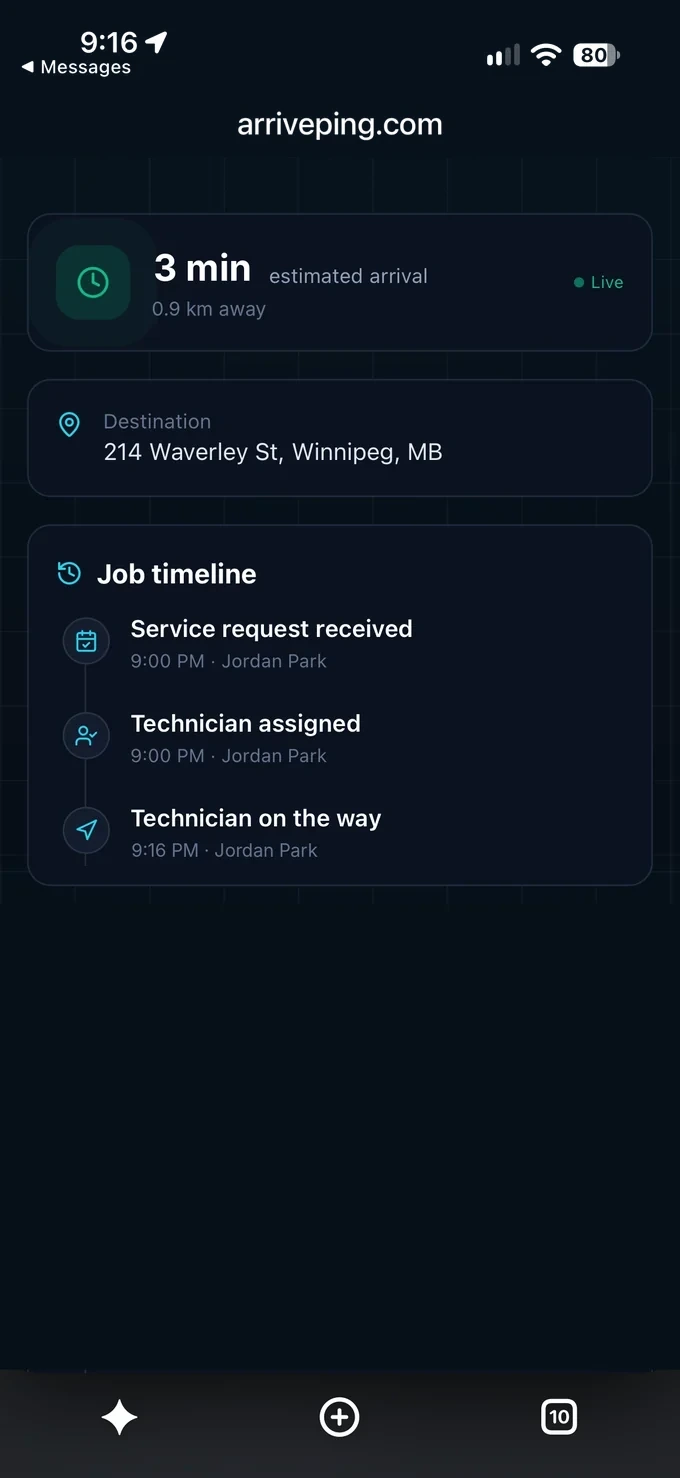
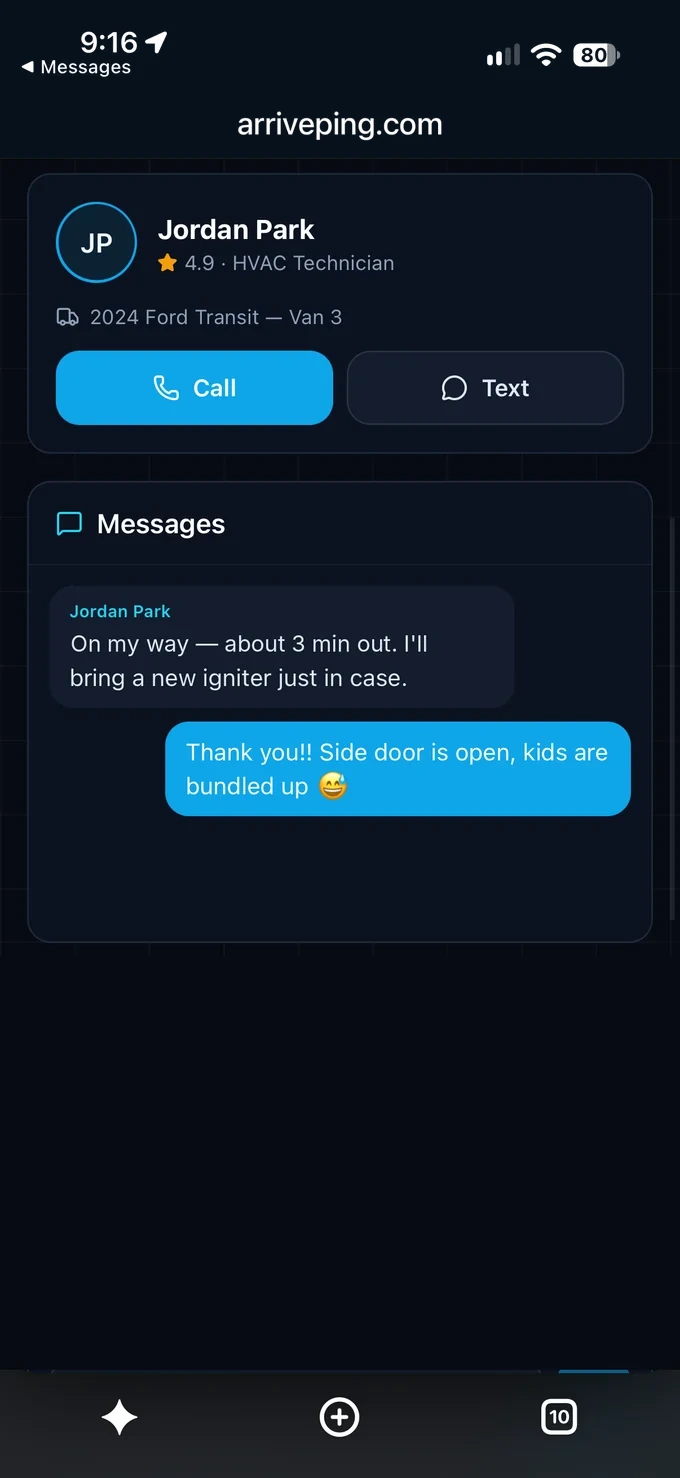
The ETA, the distance, the job's timeline and the technician, with one-tap call or text. It opens from a text or email in any phone browser; there's nothing for the customer to install. Read how the on-my-way text is worded and timed.
Which one should you choose?
Choose ArrivePing if
- You run service calls, installs or deliveries booked as appointments
- You want the tracking link sent automatically from the job, not shared by hand
- You want scheduling, dispatch and customer updates in one tool at a published price
- You want sharing to start at on the way and end at arrival, every time
Choose Glympse if
- You need location sharing for people or assets outside a job workflow
- You want live-map links inside systems you already run, such as an ERP or contact centre
- You're an enterprise that wants a visibility platform priced to its volume
- You only need a free personal app to share your own location
Sources
Competitor details are from each company's public website, checked November 1, 2026. Features and prices change; check the source before deciding. Tell us at [email protected] if anything here is out of date.
ArrivePing vs Glympse: FAQs
Is Glympse free?
Glympse says its app for sharing your own location is free to download. Its business product, Glympse PRO, is priced by volume and/or number of users, with no set-up fees or long-term commitments, on request (checked November 1, 2026).
Can Glympse send customers a technician's ETA?
Yes. Glympse PRO's help centre says it sends the customer a live tracking link by text or email when a technician, driver or mobile worker is on the way. ArrivePing does this from the work order, with the ETA, the technician's name and text or call buttons on one page.
When does ArrivePing stop sharing the technician's location?
At arrival. The customer sees the technician's location only after the technician marks the job on the way, and the live location disappears when they arrive. A geofence around the address marks arrival automatically, with a manual tap as backup.
Do customers need an app to follow the technician?
No, with either product. ArrivePing's tracking page opens in any phone browser from a text or email link, and Glympse says its links can be viewed with no app.
How much does ArrivePing cost?
US$49 a month includes one dispatcher and two drivers. Drivers 3 to 29 are $30 each and every driver from 30 on is $25, so a dispatcher and five drivers is $139 a month and ten drivers is $289. The 30-day free trial includes as many users as you want; your card is kept on file and nothing is charged until day 30. Cancel any time.

Dispatch your first job today.
Sign up, paste your website and the setup agent builds your workspace while you watch. Free for 30 days, then from US$49 a month.
- Sign upNo sales call and no demo to book.
- Paste your websiteThe agent builds your brand, services, catalog, job templates and customer texts.
- Invite your teamTechnicians join from a text on the phone they already carry.
Moving from another system or need a custom integration? [email protected]
Start your 30-day free trial
- As many users as you like, for the whole trial
- Card on file, $0 until day 30
- Cancel before day 30 and you're never billed
- Then from US$49 a month: 1 dispatcher + 2 drivers
No setup fee, no contract, no GPS hardware.