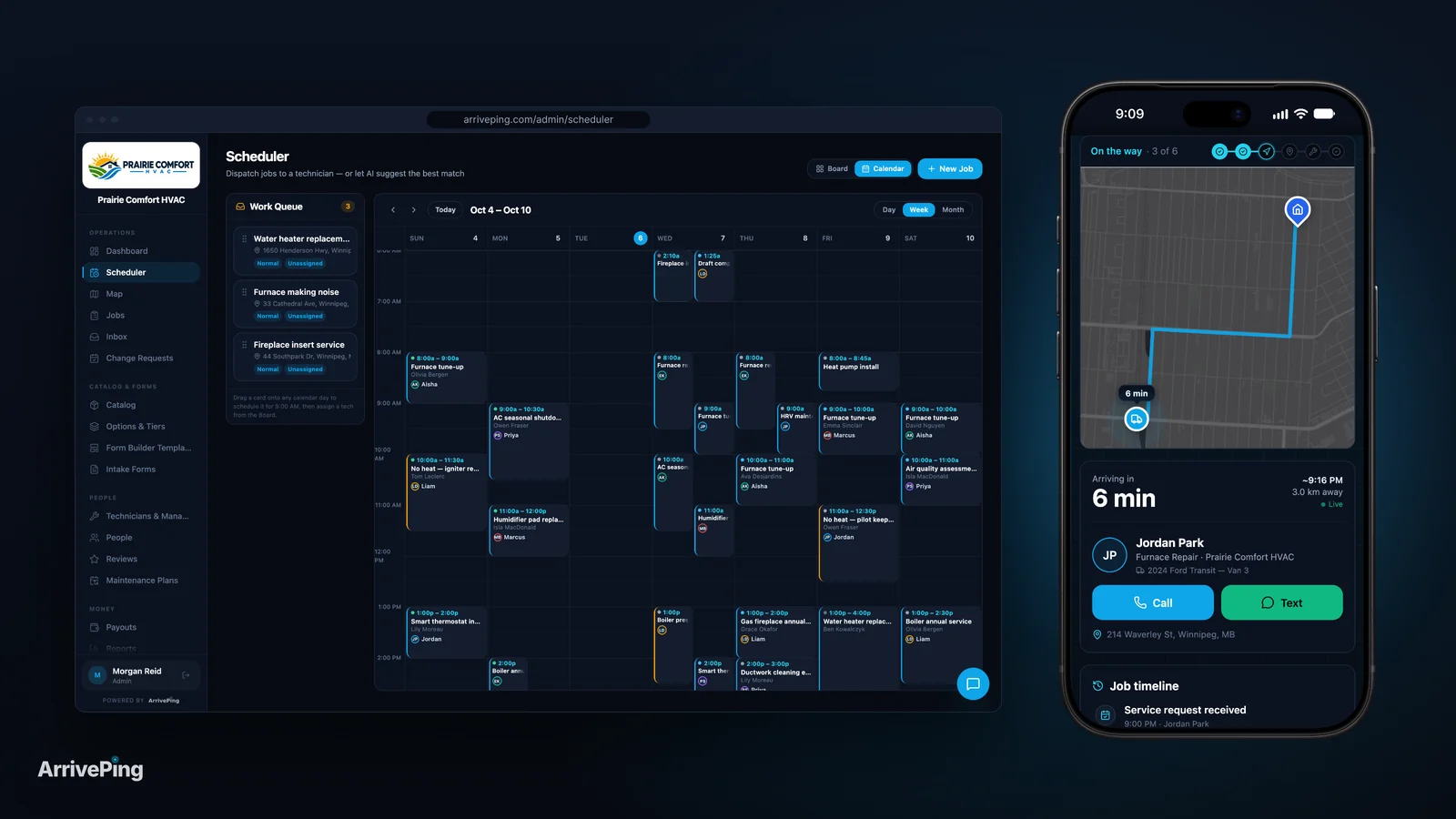
How Long Does It Take to Set Up Field Service Software?
Setup takes an hour to six months, depending on the product and who does the work. Realistic timelines, what eats the time, and a 30-day rollout plan.

Setting up field service software takes anywhere from under an hour to six months, and the product is only half of the reason. Enterprise platforms run as consultant-led projects: one Microsoft partner sells a Dynamics 365 Field Service implementation that runs "10 weeks end to end" (Columbus Global, Microsoft Marketplace), and Simpro tells buyers that kicking off "3–6 months before your target 'go-live' date works well" (Simpro, 2025). Small-business tools are measured in minutes and days. For a shop with 3 to 10 technicians, a realistic target is jobs dispatched on day one, the whole crew on the app in week one, and the old system switched off within a month.
How long does field service software take to set up, by product type?
There is no industry-wide average worth quoting, because "setup" means different things on different products. What the vendors and their partners say on their own pages is more useful, as long as you read each one for what it actually measures.
- Enterprise FSM, consultant-led. Columbus Global's Dynamics 365 offer on Microsoft's marketplace is a "10 week Agile Implementation" with "8 mandatory sprints and a further 3 optional sprints", covering discovery, configuration, work orders, scheduling, a mobile sprint and reporting before go-live (Columbus Global). Simpro's implementation guide recommends assembling your internal team "at least 4–6 weeks before your planned kickoff date", then kicking off three to six months before go-live, then scheduling training refreshers for at least the first 90 days after launch (Simpro, 2025).
- Mid-market, guided implementation. ServiceTitan's help centre doesn't publish a duration. It describes three stages: a pre-implementation stage where you "prepare your pricebook, data, and accounting setup before the Kick-Off Call", an implementation stage with an Implementation Consultant and Data Quality Analysts, and a go-live that starts with an export call to verify accounting (ServiceTitan).
- Small-business tools, guided onboarding. Housecall Pro's top plan, MAX, includes a "4-week onboarding period" of weekly training calls with an Onboarding Specialist, with the go-live date set according to how much time you put in between calls (Housecall Pro).
- Small-business tools, self-serve. Jobber's help centre lists seven basic setup steps, each with a stated "Time to complete" of 5 or 10 minutes, about 50 minutes in all, to finish before a call with its product setup team (Jobber). Those steps cover company details, branding, taxes, inviting the team, installing the app and payments; importing clients and building a price list aren't on that list.
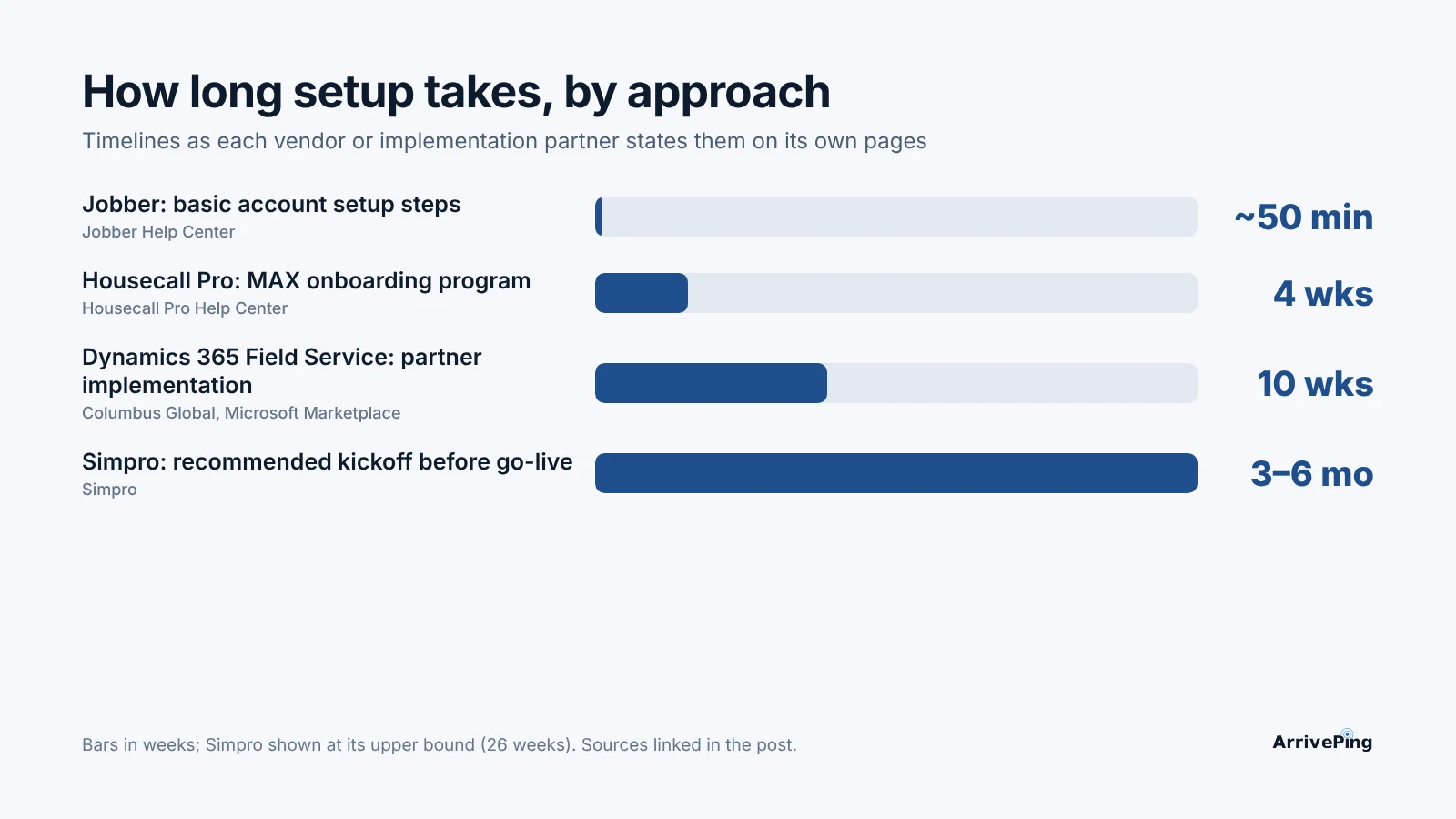
The spread is the point. A 10-week project and a 50-minute checklist are both called "setup", and they suit very different businesses. A contractor with 200 technicians, a call centre and a commercial accounting department needs the project. A plumber with six vans mostly needs the jobs on the phones by Monday.
What actually takes the time?
The software is rarely the slow part. Four jobs are, and they're the same whichever product you pick.
1. Getting your data out of wherever it lives. Most small shops aren't migrating from another system. Software Advice's analysis of its advisor calls with field service buyers found that "35% buyers use manual methods, including spreadsheets and pen-and-paper based approaches", and "nearly 26% buyers do not have any system in place yet" (Software Advice, 2026). That's good news and bad news: there's no old database to map, but the customer list may be spread across a phone, a spreadsheet and the accounting file. Customers, technicians and your price book (services and what you charge) are the three lists that matter. Everything else can wait.
2. The price book. ServiceTitan puts it in the first stage, before the kickoff call. It's the list that touches every quote and invoice, and building an itemized one from scratch is slow work. For a small shop, a short list of your standard services with a flat rate is enough to start. You can add parts and options once the crew is working.
3. Integrations, especially accounting. ServiceTitan's go-live begins with verifying the accounting export (ServiceTitan). Connecting QuickBooks or another ledger is the step that depends most on decisions only you can make: how invoices, taxes and payments map between two systems. In Software Advice's 2026 field service report, the priorities for preparing to adopt AI and new tools are led by "compatibility with existing systems (42%)", ahead of data management (33%) and in-house skills to manage the solution (32%) (Software Advice, 2026).
4. Training and the mobile rollout. The same survey found field service professionals "face disruptions when adopting new tools (64% vs. 61% across all industries)", with delays the most common problem at 41%, and 42% rated "training and upskilling employees" a highly impactful challenge (Software Advice, 2026). The field service subset was 72 respondents out of 3,385, so read it as direction rather than a precise rate. The mobile side is easier than it used to be: Pew Research found "about nine-in-ten (91%)" U.S. adults own a smartphone (Pew Research Center, 2026), and among current field service software users, "around 49%" rate mobile access as the top feature (Software Advice, 2026). Your technicians already carry the device. What takes the time is getting each of them to use it on a real job.
Which setup approach fits your business?
We compared the cost and complexity barriers in why most software projects stall. The table below is narrower: who does the setup work, and how long it takes.
| Approach | Typical time (vendor-stated) | Who does the work | Cost of setup | Main risk | Best fit |
|---|---|---|---|---|---|
| Consultant-led implementation | 10 weeks end to end (Columbus Global, Dynamics 365); kick off 3–6 months before go-live (Simpro) | Partner or vendor implementation team, plus your internal project team | Partner or vendor services on top of licences, scoped per project | Long timeline; your staff tied up in discovery, testing and sign-off | Large or multi-branch operations with commercial accounting, call centres or custom workflows |
| Guided onboarding | 4-week onboarding with weekly calls (Housecall Pro MAX); staged with an Implementation Consultant (ServiceTitan, no duration published) | You, coached by an onboarding specialist | Usually tied to a higher plan or a sales-led contract | Go-live slips when the office can't make time between calls | Mid-size shops replacing an existing system |
| Self-serve setup | About 50 minutes of basic steps (Jobber); within an hour to the first dispatched job (ArrivePing) | You, with help articles and support | Usually none beyond the subscription | Under-configured system if nobody owns it after day one | Owner-operated shops of 1–20 technicians |
Two points from the research help you choose. Capterra's survey of Canadian software buyers found "just 40% of Canadian software buyers say they are satisfied with their purchase", and that roughly half of satisfied adopters planned their rollout stages in advance, against "only 27% of disappointed buyers" (Capterra via Business Wire, 2025). Its advice: "Establish accountability for configuration, testing, and training, and schedule pilot and go-live phases in advance." That applies to a one-hour setup as much as a ten-week one. The other is payback: field service buyers expect a return in "just 9.2 months" on average (Software Advice, 2026). A three-month implementation spends a third of that before the first job is dispatched.
What does a realistic rollout look like for a 3–10 technician shop?
This is the plan we'd give a plumbing, HVAC or electrical shop with one office person and a handful of vans. It assumes a self-serve tool. If you're still deciding whether you need software at all, start with does your business need field service software?
Day one (two to three hours, one person)
- Set up the account, branding and your standard services with a flat price each.
- Import customers and technicians from the spreadsheet you already have. Don't clean every record first; fix duplicates as they come up.
- Write or approve the three customer messages that matter most: booked, on the way and running late. If you're unsure what the tracking link should say, see what a customer tracking link should show.
- Dispatch one real job, or a practice job, end to end.
Week one (the crew)
- Get every technician signed in on their phone. Do it in person at the morning meeting, not by email.
- Run new jobs only in the new system. Leave existing bookings where they are until they're done, so nobody double-books.
- Have each technician complete one job start to finish while someone in the office watches the board.
- Keep a list of every "how do I…" question. It becomes your one-page cheat sheet.
Month one (the edges)
- Retire the whiteboard, the shared calendar or the old system, on a date you announce in week one.
- Connect accounting. Until a direct integration exists, export invoices on a fixed day each week.
- Add the extras you skipped: job checklists, parts, booking forms, reports.
- Review the month: jobs dispatched, calls the office took asking "where's the tech?", and what the crew still does on paper.
Most of the delay in a small rollout comes from trying to finish month one's work before day one. Get the first job out, then improve the setup while the business runs on it.
Playbook: how to shorten setup this week
- Pick one owner and a go-live date. One named person, one date on the calendar, before you sign up. The Capterra data says planned rollouts are the ones people are happy with.
- Pull three lists into spreadsheets today. Customers (name, phone, email, address), technicians (name, phone, email, skills) and services (name, flat price). That's the whole migration for most small shops.
- Price the top 20 services, not the catalog. Start with the jobs you do every week. Parts and options can come in month one.
- Decide how accounting will work before you start. Direct integration, scheduled export or manual entry. Write it down so it doesn't block go-live.
- Time the setup. Start a clock at sign-up and stop it at the first dispatched job. If a vendor can't get you there in your trial, the rollout will be slower with real customers.
- Book a 15-minute crew session for day two. Phones out, app installed, one practice job each. That's the mobile rollout.
- Set a review for day 30. Compare inbound "where's the technician?" calls and paper still in use against the week before you started.
How ArrivePing does this
ArrivePing is field service software made by NVC360 in Winnipeg, Manitoba. It started as the dispatch tool for a specialty subcontractor running more than 800 field technicians, and it's built so a small team can set it up without a consultant.
- Setup by AI. You give the setup agent your website. It builds your workspace with your brand, services, a priced catalog, job templates, intake forms and customer texts, then asks a few questions about how you work. Most teams dispatch their first job within an hour (field service management software).
- Bring your lists. Customers and technicians import from CSV or Excel, from your old software or your own spreadsheet. Imported customers aren't contacted, and if you'd rather not do it yourself, send us the file and we'll import it for you.
- Mobile rollout on the phones they carry. Technicians use the ArrivePing app on iPhone and iPad, or ArrivePing in an Android phone's web browser. Jobs arrive as offers they accept, then Start Driving, I've Arrived and Complete Job. Dispatchers work in the web console, where the dispatch software ranks technicians by distance, skills, availability and workload.
- Try it with the whole crew. A 30-day free trial with as many users as you like; nothing is charged until day 30. After that, $49 a month covers one dispatcher and two drivers, and drivers 3 to 29 are $30 each, so ten drivers cost $289 a month. No setup fee, no contract, no GPS hardware (pricing). For how that compares across team sizes, see what field service software costs.
When not to choose us. If accounting sync is a day-one requirement, ArrivePing doesn't connect natively to QuickBooks or Xero yet; both are on the roadmap. Today it exports to CSV, Excel, PDF or JSON and sends job events through webhooks, Zapier or Make. And if you run a large operation that needs a call centre, marketing, payroll and commercial accounting in one system, an enterprise platform with a consultant-led implementation is the better fit, and worth the months it takes.
FAQ
How long does it take to implement field service software?
It depends on the product. Enterprise implementations run for months: one Microsoft partner sells a 10-week Dynamics 365 Field Service implementation, and Simpro recommends kicking off three to six months before go-live. Small-business tools take minutes to days; Jobber's basic setup steps add up to about 50 minutes, and ArrivePing's AI setup gets most teams to their first dispatched job within an hour.
What takes the longest when setting up field service software?
Usually the data and the accounting, not the software. Building a price book, cleaning customer lists and deciding how invoices map to your accounting system take longer than configuring the app. Training is the other big one: 42% of field service respondents in Software Advice's 2026 survey rated training and upskilling employees a highly impactful challenge.
How long does it take technicians to learn a field service app?
For a simple technician app, a single crew session and a few real jobs is usually enough. Nearly all technicians already carry a smartphone (Pew Research puts U.S. ownership at 91%), so the rollout is about habits, not devices. Install the app with the crew in person and have each technician complete one job while the office watches.
Can a small business set up field service software without a consultant?
Yes. Self-serve tools are built for an owner or office manager to set up from a spreadsheet of customers, technicians and services. A consultant-led implementation makes sense for large operations with complex accounting, call centres or custom workflows, where the setup is a project in its own right.
Sources
- Columbus Global UK, D365 Field Service 10 week Agile Implementation, consulting offer on Microsoft Marketplace (checked November 1, 2026). https://marketplace.microsoft.com/cs-cz/marketplace/consulting-services/columbus_global_uk.cukd365cefieldsvsimplementation
- Simpro, The Ultimate Guide: How to Implement Field Service Management Software, published October 22, 2025. https://www.simprogroup.com/blog/how-to-implement-field-service-management-software
- ServiceTitan Help Center, Getting started with ServiceTitan (checked November 1, 2026). https://help.servicetitan.com/docs/getting-started-with-servicetitan
- Housecall Pro Help Center, MAX onboarding support overview (checked November 1, 2026). https://help.housecallpro.com/en/articles/4936654-max-onboarding-support-overview
- Jobber Help Center, First steps: basic account set up (checked November 1, 2026). https://help.getjobber.com/en/articles/first-steps-basic-account-set-up/
- Software Advice, Field Service Software Buyer Insights, published April 13, 2026 (advisor interactions with SMB buyers, January 2025 to January 2026). https://www.softwareadvice.com/resources/field-service-software-buyer-insights/
- Software Advice, Field Service Buying Trends: Priorities for 2026, published January 22, 2026 (2026 Software Buying Trends survey, 3,385 respondents in 11 countries, August 2025; 72 field service respondents). https://www.softwareadvice.com/resources/field-service-buying-trends-priorities-2026
- Pew Research Center, Mobile Fact Sheet (survey conducted January 30 to June 18, 2026). https://www.pewresearch.org/internet/fact-sheet/mobile/
- Capterra, Regret Follows Disruption: 89% of Canadian Software Purchases Stumble After Rollout Issues, Business Wire, November 11, 2025 (from Capterra's 2026 Software Buying Trends Report). https://www.businesswire.com/news/home/20251111025583/en/Regret-Follows-Disruption-89-of-Canadian-Software-Purchases-Stumble-After-Rollout-Issues-Capterra-Survey-Finds