When a Technician Calls In Sick: How to Rebuild the Day Before 8 a.m.
A sick call at 6:40 a.m. puts four jobs in doubt. How often it happens in the trades, the order to rebuild the day, and what to tell each customer.

When a technician calls in sick, rebuild the day in this order: record the absence, sort their jobs by how much a delay would hurt the customer, move the urgent ones to the closest qualified person who is free, and tell every affected customer before they start waiting. Done in the first half hour, most of the day survives. It will happen more often than it feels: in a typical 2025 survey week, 2.4% of full-time installation, maintenance and repair workers missed part of their week through their own illness or injury (U.S. Bureau of Labor Statistics, 2025), and four in five private-industry workers now have paid sick leave to take (BLS, 2026).
How often do field technicians call in sick?
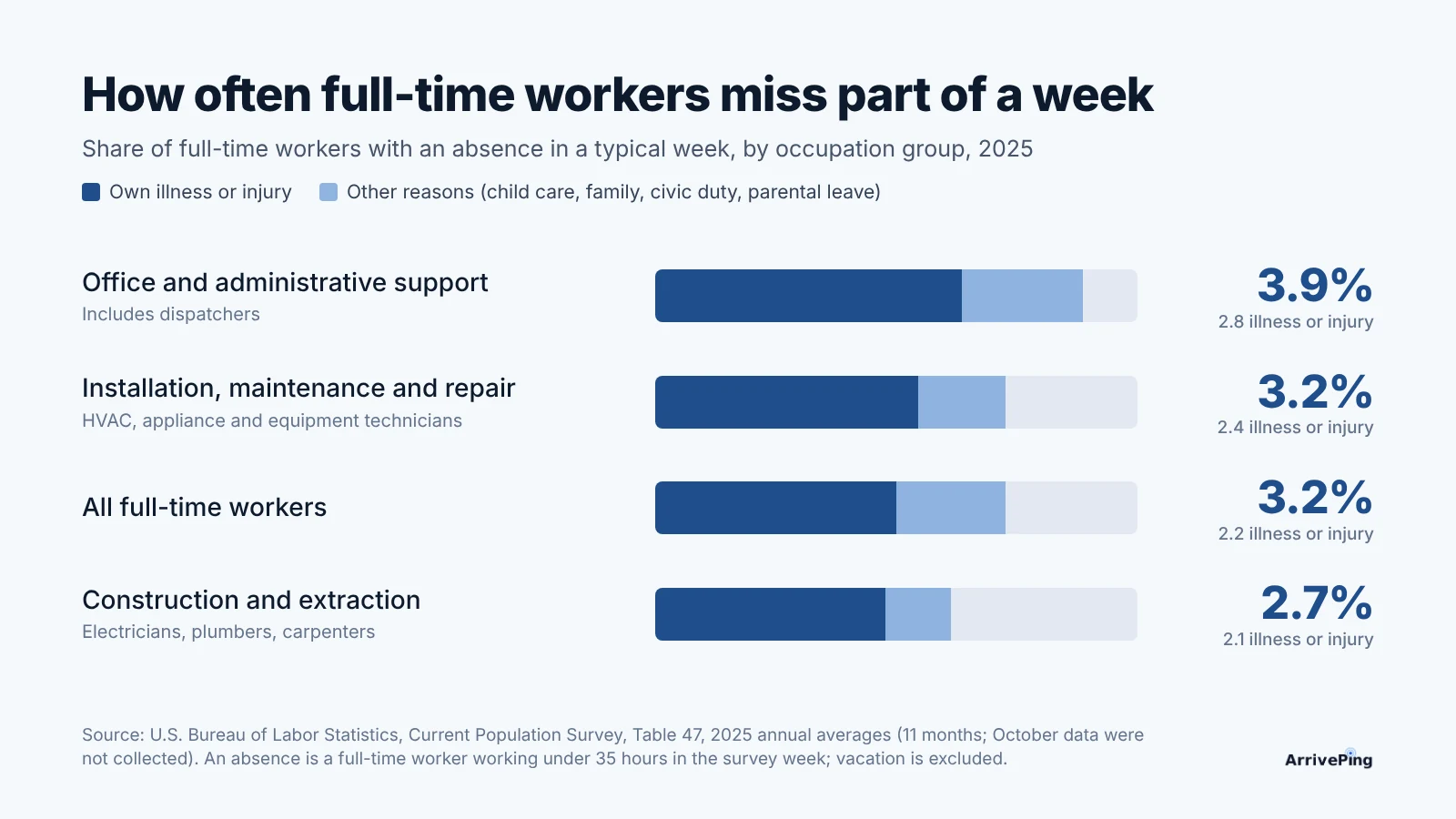
Often enough to plan for, rarely enough that most small teams don't. The Bureau of Labor Statistics counts an absence when someone who usually works full time works less than 35 hours in the survey week for their own illness, injury or medical problem, child care, family obligations, civic duty or parental leave; vacation and personal days don't count (BLS, Table 46). Its 2025 averages:
- All full-time workers: an absence rate of 3.2%, of which 2.2 points were illness or injury, and 1.7% of usual hours lost (BLS, Table 46).
- Installation, maintenance and repair occupations (HVAC, appliance, equipment and line technicians): 3.2%, with 2.4 points for illness or injury, the highest illness share of the trade groups, and 1.9% of hours lost (BLS, Table 47).
- Construction and extraction occupations (electricians, plumbers, carpenters): 2.7%, with 2.1 points for illness or injury (BLS, Table 47).
- Office and administrative support, which includes dispatchers: 3.9%, with 2.8 points for illness or injury (BLS, Table 47). The person who rebuilds the day is the likeliest to be the one who is out.
The 2025 figures average 11 months, because October data weren't collected during the federal government shutdown (BLS, Table 47).
What that means for a five-technician team
The lost worktime rate is hours absent as a percent of hours usually worked (BLS, Table 46), so it converts straight into days. Five technicians working 21 eight-hour days is 840 hours a month. At the 1.4% that installation, maintenance and repair workers lost to their own illness or injury in 2025 (BLS, Table 47), that is about 11.8 hours, roughly one and a half technician-days a month. Counting every reason in the definition (1.9%), it is about 16 hours, or two days. These are national averages; flu season and a single sick household can put three of those days in one week.
Why do sick days hit small service teams harder?
Because there is no spare. Paid sick leave reached 80% of private-industry workers in 2025, from 98.0% in the Pacific census division to 63% in the East South Central division (BLS, 2026). That is good for the crew and for customers: a technician with the flu shouldn't be in someone's kitchen. But a five-person team that books four jobs per technician has no bench, so one call turns into four customers whose plans just changed.
The jobs don't all carry the same cost if they slip:
- Safety and loss calls: no heat in a cold snap, an active leak, no power to a fridge full of medication. These can't wait for tomorrow.
- Customers taking time off work. A missed appointment costs them a day's leave, and costs you the review.
- Jobs tied to someone else's schedule: an inspection, a closing date, a general contractor's next trade.
- Flexible work: maintenance visits, quotes, follow-ups. These are what you move.
What should a dispatcher do first?
Move fast on the urgent jobs, then tell people. The order below takes about twenty minutes once it's a habit.
- Record the absence before anything else. If the day off is in the system, no one (and no automatic rule) gives the sick technician new work while you are busy with the rest.
- List their jobs and sort them into the four groups above.
- Reassign the urgent jobs to the closest qualified person who can go now. Check the skill first: the closest person without a gas ticket or a refrigerant certification costs a second visit. Our post on assigning the closest qualified technician covers that order in detail.
- Ask who can take one more. A short message to everyone who is free often finds a technician whose 2 p.m. finished early.
- Reschedule what's left to the first open slot that suits the customer, not just the first open slot.
- Tell every affected customer before their window starts, with the new time or the new technician's name. An unexplained no-show is what they remember.
Which option for which job
| Option | When it fits | What the customer hears |
|---|---|---|
| Reassign today, same window | Urgent or time-off-work jobs, and a qualified technician nearby has room | "Your appointment is still on today. Alex will be there instead of Jordan." |
| Move to later today | The job can wait a few hours and someone frees up after lunch | "We need to move you to 1 to 3 p.m. today. Does that still work?" |
| Reschedule to another day | Maintenance, quotes and follow-ups; customers with flexible days | "Jordan is out sick. Can we move your visit to Thursday morning?" |
| Keep and add a helper | A two-person job where one person can start alone | Nothing, if the arrival time holds |
How do you tell customers without making it worse?
Message them, don't wait for them to call. Say what changed, give the new time or the new technician's name, and ask them to reply only if it doesn't work. Keep the reason short: "out sick" is enough, and it is the technician's health information, not the customer's business beyond that. If a job is moving to another day, give two options rather than asking "when works for you?", which starts a back-and-forth. The wording of the messages around a visit is covered in what to text customers before a service visit.
Playbook: be ready for the next 6:40 a.m. call
- Write the sick-call procedure down: who the technician texts or calls, by what time, and who covers if that person is the one who is sick.
- Tag every job with a priority when it's booked, so the sort in step 2 is already done.
- Keep skills and certifications on each technician's profile, not in the dispatcher's head.
- Keep one short "who can take one more?" message ready to send to the free technicians.
- Save the customer messages from the table above as templates.
- Leave a little slack in flu season: one unbooked slot per technician per day in January and February turns a sick call from a crisis into a reshuffle.
- After each sick day, check the numbers: how many jobs moved, how many customers you reached before their window, and how many complained.
How ArrivePing does this
ArrivePing is field service software made by NVC360 in Winnipeg, Manitoba. It began as the dispatch tool for National Interiors, a specialty subcontractor that ran more than 800 field technicians, where a morning without a few people in it was normal.
- Time off blocks new work. Record the day as Time off on the technician's profile. Assigning them a job then shows a warning, which a dispatcher can override, and assignment rules never assign over it.
- Moving jobs is a drag. In the Scheduler's Day view, drag a job onto another technician's row, or press Find a slot to see the best three fits, ranked by skill, drive time and how full each day is. ArrivePing's dispatch software puts qualified people first, and High or Urgent jobs lean towards whoever can go now.
- Everyone is told. A reassigned technician is notified straight away, and the customer gets an updated confirmation through your customer notifications. Broadcast sends one message to every available technician ("who can take a furnace call at 2?").
- Mid-day sick calls too. A technician who gets sick after accepting a job taps Send back to dispatch and picks a reason (Personal emergency is one); the office sees the reason and reassigns.
- Plans start at $49 USD a month for one dispatcher and two technicians, with a 30-day free trial (pricing).
When ArrivePing isn't the right choice: if you need sick-leave balances, accruals and payroll rules, use your payroll or HR software. ArrivePing records shifts and days off so dispatch can plan around them; it doesn't track leave entitlements.
FAQ
What should I do when a technician calls in sick?
Record the absence, sort their jobs by urgency, reassign the urgent ones to the closest qualified technician who is free, and reschedule the flexible ones. Message every affected customer before their arrival window starts, with the new time or the new technician's name.
How often do technicians miss work because of illness?
In 2025, 2.4% of full-time installation, maintenance and repair workers missed part of a typical week through their own illness or injury, and the group lost 1.4% of its usual hours to it, according to the Bureau of Labor Statistics. For five technicians, that is roughly one and a half technician-days a month.
Should I tell the customer why the technician isn't coming?
Briefly. "Jordan is out sick" is enough, followed by the new time or the new technician's name. Don't share more about the technician's health than that.
Is it better to reschedule or send a different technician?
Send a different technician when the job is urgent or the customer took time off for it, as long as the replacement holds the skills or certifications the job needs. Reschedule maintenance visits, quotes and follow-ups, offering the customer two specific times.
How do I stop assignment rules from giving work to someone who is off sick?
Record the absence in your dispatch software before you start moving jobs. In ArrivePing, a day recorded as Time off blocks new assignments: a dispatcher gets a warning, and automatic rules skip the technician.
Sources
- U.S. Bureau of Labor Statistics, Current Population Survey, Table 47: Absences from work of employed full-time wage and salary workers by occupation and industry, 2025 annual averages. https://www.bls.gov/cps/cpsaat47.htm
- U.S. Bureau of Labor Statistics, Current Population Survey, Table 46: Absences from work of employed full-time wage and salary workers by age, sex, race, and Hispanic or Latino ethnicity, 2025 annual averages (definitions of absence and lost worktime). https://www.bls.gov/cps/cpsaat46.htm
- U.S. Bureau of Labor Statistics, The Economics Daily: Paid sick leave was available to 80 percent of private industry workers in 2025, 2026. https://www.bls.gov/opub/ted/2026/paid-sick-leave-was-available-to-80-percent-of-private-industry-workers-in-2025.htm