Winter Arrival Times: What Snow Does to ETAs, and What to Tell Customers
Snow cuts city driving speeds by 30 to 40 percent. What that does to a day of appointments, and the messages that keep customers calm without rushing crews.
Snow makes every drive between appointments longer, so a winter schedule built on dry-road drive times falls behind by mid-morning. On snowy or slushy pavement, average speeds on city arterials drop by 30 to 40 percent (Federal Highway Administration), which turns a 25-minute drive into 36 to 42 minutes and puts the fourth appointment of the day 43 to 67 minutes behind. The fix is to plan for the slower drive, give customers a live ETA instead of a promise, and send a running-late notice the moment a window slips, so no one has to speed on ice to keep it.
How much does snow slow down driving?
A lot on city streets, and unpredictably on highways. The Federal Highway Administration (FHWA) puts it plainly: "Snow and ice reduce pavement friction and vehicle maneuverability" (FHWA, Snow and Ice). Its figures:
- Arterial roads: average speeds fall 30 to 40 percent on snowy or slushy pavement, against 10 to 25 percent on wet pavement (FHWA, How Do Weather Events Impact Roads?).
- Freeways: speeds fall 3 to 13 percent in light snow and 5 to 40 percent in heavy snow (FHWA, Snow and Ice).
- Capacity: heavy snow cuts freeway capacity by 12 to 27 percent, so the same traffic jams sooner (FHWA, How Do Weather Events Impact Roads?).
- Delay in general: across weather events, travel time delay on arterials can rise by 11 to 50 percent (FHWA, How Do Weather Events Impact Roads?).
Most service calls are on arterials and residential streets, not freeways, so the 30 to 40 percent figure is the one to plan with.
What does that do to a day of appointments?
It compounds. The delay on each drive carries into every appointment after it.
A worked example
These are assumptions. Change them to your own.
| Input | Value | Where it comes from |
|---|---|---|
| Drive to each job on dry roads | 25 minutes | Assumption |
| Drives before the fourth job of the day | 4 (shop to job 1, then 1→2, 2→3, 3→4) | Assumption |
| Speed on snowy or slushy arterials | 30 to 40 percent slower | FHWA |
When speed falls by 30 percent, a trip takes 1 ÷ 0.7, or about 1.43 times as long; at 40 percent slower, 1 ÷ 0.6, or 1.67 times. So the 25-minute drive becomes 36 to 42 minutes, 11 to 17 minutes longer. Over four drives, the fourth customer of the day is 43 to 67 minutes behind, even if every job on site took exactly as long as planned.
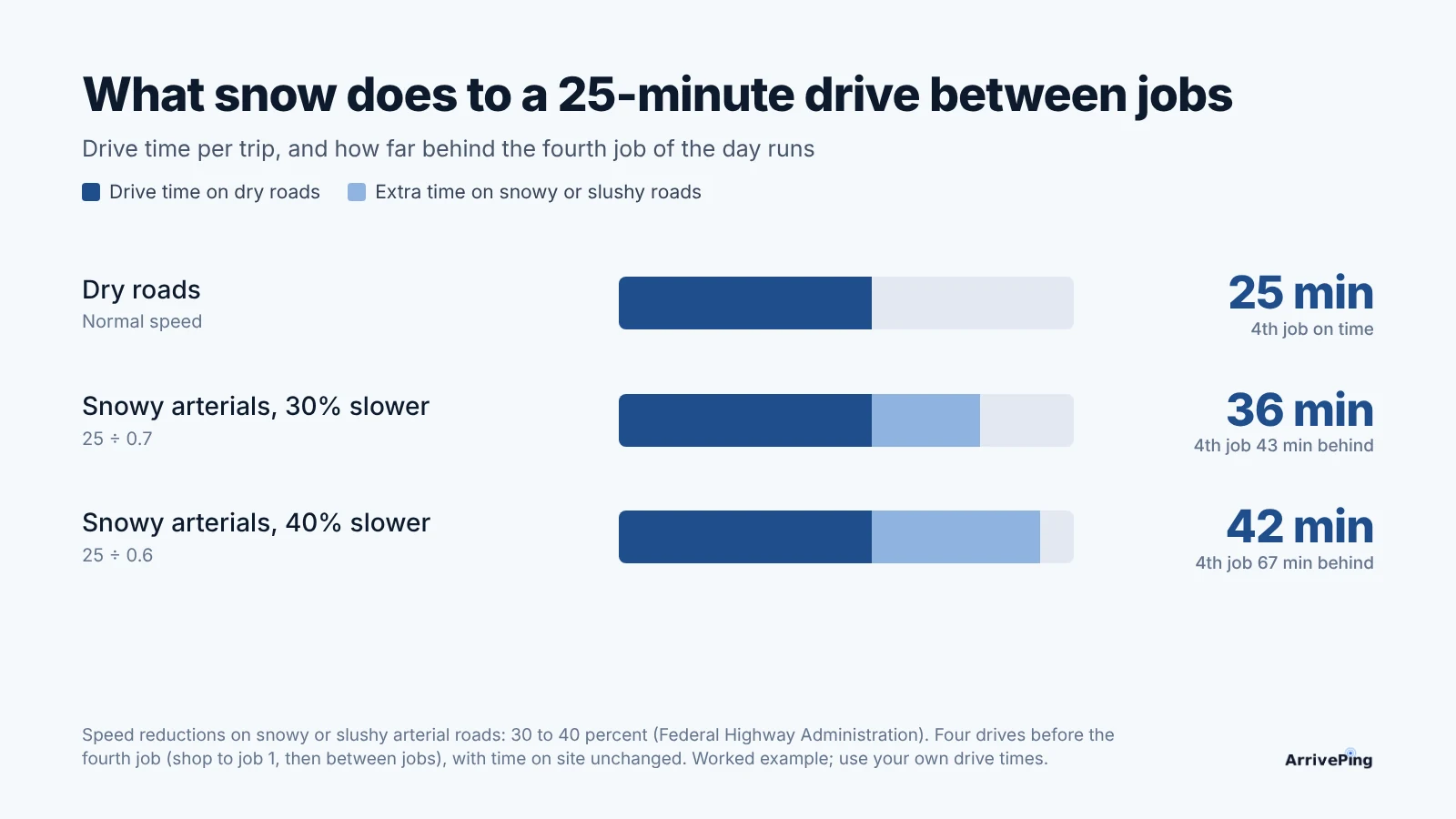
That is the gap between a customer who waits calmly and one who calls the office at 2:15 asking where the technician is.
Why shouldn't technicians make up the time?
Because the time gets made up on ice. Each year, 24 percent of weather-related vehicle crashes in the U.S. happen on snowy, slushy or icy pavement, and more than 1,300 people are killed and more than 116,800 injured in crashes on those roads (FHWA, Snow and Ice). A schedule that only works if the technician drives as if the roads were dry is a schedule that asks them to take that risk. Moving the customer's expectation is cheaper than any of the alternatives.
What should you tell customers on a snow day?
Tell them early, tell them the truth, and give them something to watch instead of a clock.
| Situation | What to send | When |
|---|---|---|
| Snow is falling or forecast for the morning | A short heads-up to everyone booked today: "Roads are slow this morning. We'll text you a live link when your technician heads out." | Before the first window opens |
| The window still holds | Nothing extra; the usual on-my-way text with a live ETA does the work | When the technician leaves |
| The projected arrival moves past the window | A running-late notice with the new time | As soon as it slips, not when the customer calls |
| A road or driveway isn't safe today | A phone call, an apology and two new times | As early as you know |
Keep each message short and give the new time, not just "running late." Don't send an update for every few minutes of change; the live ETA covers small changes, and too many texts read as noise. Our post on what to text customers before a service visit has the full set of message templates.
Playbook: get ready before the first snowfall
- Book winter days lighter. If a technician does four jobs on a dry day, plan three on a day with heavy snow forecast, and keep the fourth slot for whatever slipped.
- Widen the first-day-of-snow windows, not every window all winter. The first real snowfall is when drivers haven't adjusted yet.
- Write the snow-day heads-up now and save it as a template, so it goes out by 7 a.m. without anyone composing it.
- Turn on running-late notices so a slipping window triggers a message on its own.
- Tell your crew, in writing, that the schedule moves and they don't. No one speeds to hit an ETA.
- Ask customers to clear a path. A line in the booking confirmation ("please clear the walk and driveway to the door") saves minutes on site and a slip on the step.
- After the first storm, compare planned and actual drive times and adjust the next storm's bookings.
How ArrivePing does this
ArrivePing is field service software made by NVC360 in Winnipeg, Manitoba. It began as the dispatch tool for National Interiors, a specialty subcontractor that ran more than 800 field technicians.
- A live ETA instead of a promise. When the technician taps Start Driving, the customer gets an on-my-way text with a link to a live page: the technician moving on a map, the ETA, and buttons to text or call them. Location comes from the ArrivePing app on the technician's phone (technician GPS tracking), and the page stops showing it once they arrive.
- Running late without a phone call. When a technician's projected arrival moves past the customer's window, the job appears on the dashboard's Running Late board, and the customer automatically gets a running-late notice with the new arrival window. The running-late, on-the-way and arrived messages are drafted in your voice during setup and you can edit them; a typical running-late text reads: "Hi {first name}, {Tech} is running about {delay} behind. New ETA {ETA}. Live map: {link}. Reply if that no longer works for you."
- One message to the whole crew. Broadcast sends a note to everyone, the available technicians only, or a skill or tag: the place for "roads are bad, take your time, the office is moving the afternoon."
- Plans start at $49 USD a month for one dispatcher and two technicians, with a 30-day free trial (pricing).
When ArrivePing isn't the right choice: if your winter work is snow clearing on fixed routes, with dozens of properties to plow in order, you need a route planning tool. ArrivePing dispatches one appointment at a time and doesn't re-sequence a day's stops into an optimal loop.
FAQ
How much does snow slow down traffic?
According to the Federal Highway Administration, average speeds on arterial roads fall 30 to 40 percent on snowy or slushy pavement. Freeway speeds fall 3 to 13 percent in light snow and 5 to 40 percent in heavy snow, and heavy snow cuts freeway capacity by 12 to 27 percent.
How much longer does a drive take in snow?
At 30 to 40 percent lower speeds, a trip takes about 1.4 to 1.7 times as long. A 25-minute drive between jobs becomes 36 to 42 minutes, and over four drives the fourth appointment of the day can run 43 to 67 minutes behind.
Should I tell customers about weather delays before they happen?
Yes. A short message before the first window opens, saying roads are slow and a live tracking link will follow, sets expectations early. Then send a running-late notice with a new time only if their window actually slips.
What should a running-late text say?
Who is coming, roughly how late they are, the new arrival time, a link to the live map and an invitation to reply if the new time doesn't work. Skip the long apology; the new time is what the customer needs.
Sources
- Federal Highway Administration, Road Weather Management Program, Snow and Ice. https://ops.fhwa.dot.gov/Weather/weather_events/snow_ice.htm
- Federal Highway Administration, Road Weather Management Program, How Do Weather Events Impact Roads? https://ops.fhwa.dot.gov/weather/roadimpact.htm