
Jobber alternatives, compared on price and live tracking
Jobber is a strong all-in-one tool for quotes, invoices and payments. Teams usually look elsewhere for one of three reasons: the price as the team grows, live customer tracking without vehicle hardware, or automatic dispatch. Here are six options, ArrivePing first, with every price linked to its source.
Free for 30 days · Then from US$49 a month · No setup fee, no contract
 Technician app for iPhone and iPad. On Android, technicians use ArrivePing in the phone's web browser.
What is a good alternative to Jobber?
If your priority is getting technicians to customers on time, ArrivePing by NVC360 auto-assigns the closest qualified technician and texts customers a live tracking link from the tech's phone, from $49 a month for one dispatcher and two drivers. For a broad all-in-one, look at Housecall Pro or Workiz; for low published team pricing, Kickserv; for large contractors, ServiceTitan; for route planning, Arrivy.
Last updated
How do Jobber alternatives compare on price?
Published starting prices, trials and what the customer gets when the technician is on the way. Jobber is included for reference.
Starting prices are the lowest published plan; plans include different numbers of users and features. Competitor details checked November 1, 2026.
Which Jobber alternative fits your team?
Six options, ArrivePing first. Each says who it suits; none is the right answer for everyone.
ArrivePing by NVC360
- Starting price
- $49/mo incl. 1 dispatcher + 2 drivers; then $30 per driver, $25 from driver 30 (graduated)
- Free trial
- 30 days, as many users as you want; card on file, nothing charged until day 30
- Stands out for
- Automatic dispatch by distance, skills, availability and workload, and a live customer tracking link from the tech's phone, in every plan
Choose it if
- Arrival times are the problem you're fixing
- You want the closest qualified tech assigned automatically
- You'd rather not buy trackers for every van
Housecall Pro
- Starting price
- Basic $59/mo billed annually or $79/mo monthly, 1 user
- Free trial
- 14 days, no credit card
Choose it if
- You want marketing, online booking and payments from one vendor
- You already use, or want, vehicle GPS hardware
- You value a large, established user base
Kickserv
- Free trial
- 30 days
Choose it if
- You want a low published price for a team of five or more
- Text reminders are enough and a live map link isn't needed
- You want a 30-day trial
Workiz
- Free trial
- 7 days, no credit card
Choose it if
- You want phone, marketing, invoicing and scheduling in one platform
- You're happy to request a quote
- You want the technician's photo and bio in the arrival text
ServiceTitan
- Fleet tracking
- Fleet Pro, a Pro product: real-time vehicle GPS, geofencing and driver scorecards; priced by demo
- Best for
- Large residential and commercial contractors
Choose it if
- You run a large contractor with accounting, marketing and pricebook needs
- You want vehicle cameras and driver scoring
- You have the budget and time for an enterprise rollout
Arrivy
- Starting price
- Premium $50/user, minimum 3 users; SMS notifications listed on Custom plans (Contact Us)
- Free trial
- 14 days, no credit card
- Customer updates
- Live ETAs and a live map of the crew's approach
Choose it if
- You plan multi-stop routes and want route planning built in
- You run delivery or warehouse workflows as well as field crews
- Your crew needs a native Android app today
Is there a cheaper alternative to Jobber?
It depends on headcount. Jobber Core is $49 a month for one user, with extra users at $29 a month each, and Jobber's 5-user Connect plan is $199 a month without commitment or $149 billed annually. ArrivePing is $49 a month for one dispatcher and two drivers, then $30 for each driver from 3 to 29, so a dispatcher and five drivers is $139 a month. Kickserv's Start plan is $60 a month for five users.
Compare the price for the team you'll have in a year, and check what's included at that price. In ArrivePing the live tracking link, automatic dispatch and the technician app are in every plan. See ArrivePing pricing and every feature.
What does live tracking without hardware look like?
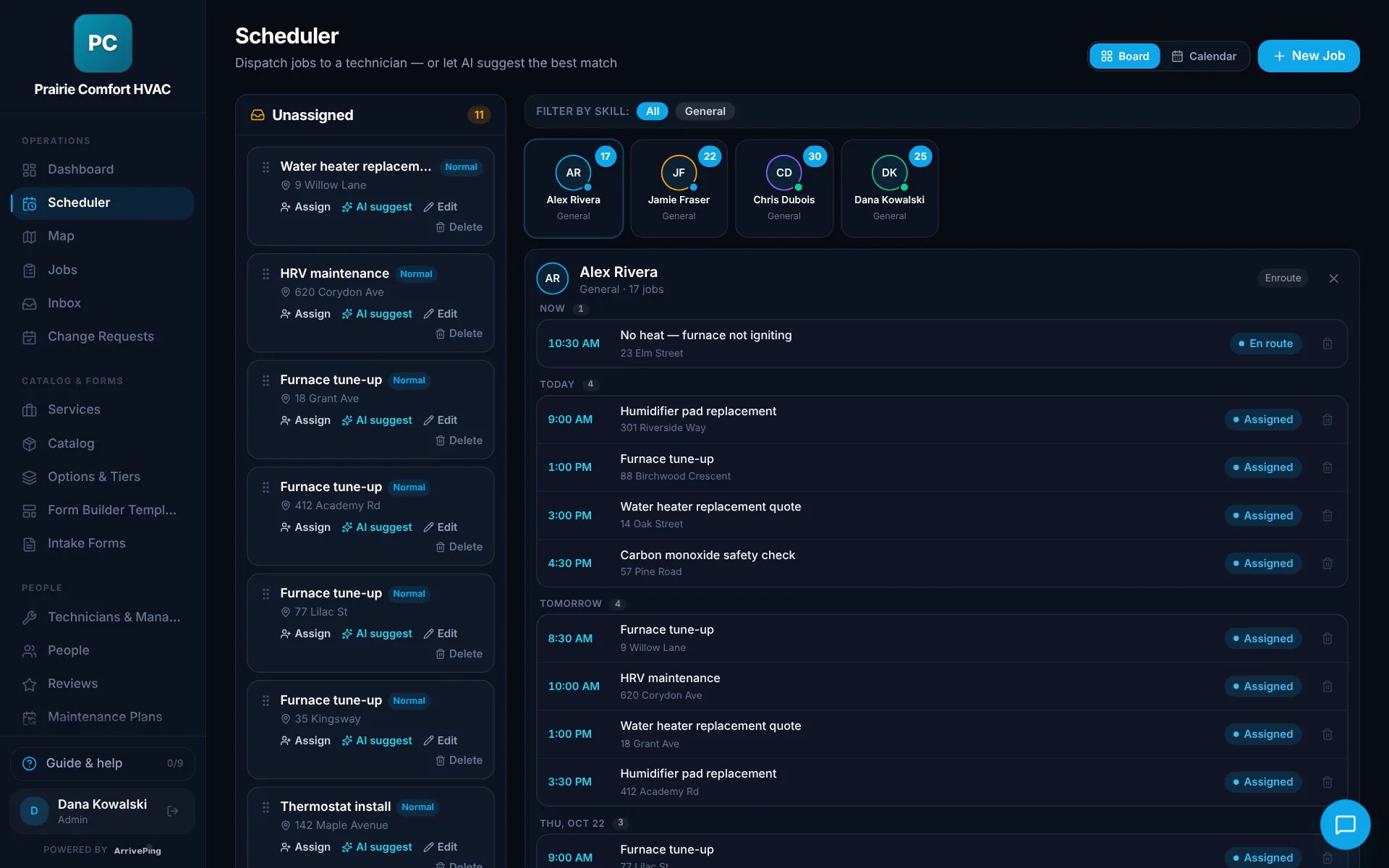
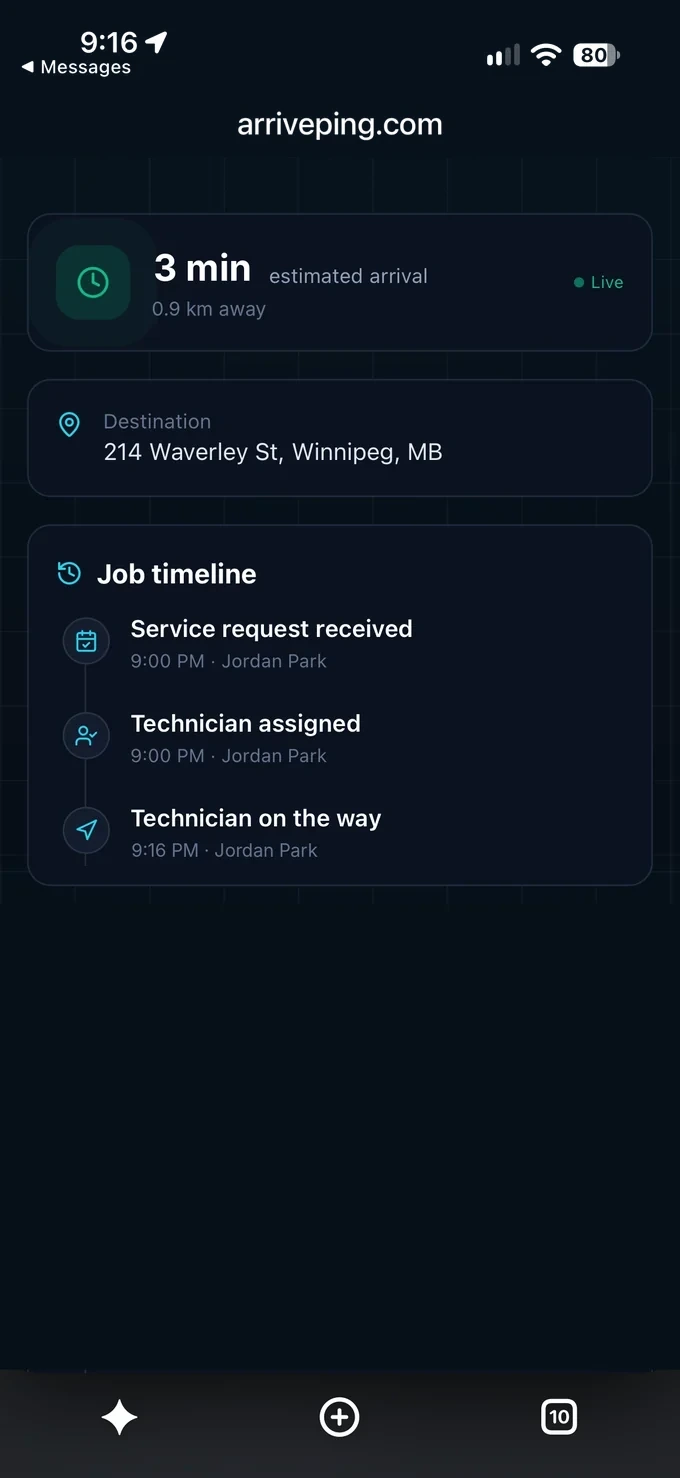
The office sees every job and technician on one board and can let ArrivePing suggest who should go. When the technician taps Start Driving, the customer gets an on-my-way text with a live page that shows the ETA.
When should you stay with Jobber?
Switching costs time. Jobber remains a good fit if:
- Quoting, invoicing and online payments are most of what you use it for
- Your customers rarely ask where the technician is
- You already run FleetSharp or Force Fleet Tracking devices and like the vehicle data
- Your team is one person and Core covers what you need
Sources
Competitor details are from each company's public website, checked November 1, 2026. Features and prices change; check the source before deciding. Tell us at [email protected] if anything here is out of date.
- Jobber pricing
- Jobber GPS tracking
- Jobber product update: Force Fleet Tracking live tracking links in On My Way texts (Aug 21, 2025)
- Jobber help centre: Jobber and Force Fleet Tracking
- Housecall Pro pricing
- Housecall Pro vehicle GPS tracking
- Kickserv pricing
- Workiz pricing plans
- Workiz On My Way
- ServiceTitan pricing
- ServiceTitan Fleet Pro
- Arrivy pricing
- Arrivy customer experience
Jobber alternatives: FAQs
What is the cheapest alternative to Jobber?
Of the tools on this page with published prices (checked November 1, 2026), Jobber Core starts at $49 a month for one user and ArrivePing at $49 a month for one dispatcher and two drivers. Kickserv's Start plan is $60 a month for five users. The cheapest option depends on your team size and which features you need included.
Is there a Jobber alternative with live GPS tracking and no hardware?
Yes. ArrivePing tracks technicians through the app on their phones and sends customers a live tracking link with the ETA, in every plan. Jobber's live map uses FleetSharp devices installed in vehicles, and its On My Way texts can include a live link through the Force Fleet Tracking integration, which needs a GPS tracker plugged into the vehicle, a Force subscription and a US account on Connect or higher (checked November 1, 2026).
How much does Jobber cost?
Jobber's pricing page listed Core at $49 a month for one user without commitment, Connect from $139, Grow from $199 and Plus from $499 for five users, with extra users at $29 a month each and a 14-day free trial on Grow (checked November 1, 2026).
Can I move my customers from Jobber to ArrivePing?
Yes. Export your customers and team as a CSV or Excel file and upload it, or send us the file and we'll import it for you. Customers aren't contacted when they're imported, and technicians get an email to set their password.
How much does ArrivePing cost?
US$49 a month includes one dispatcher and two drivers. Drivers 3 to 29 are $30 each and every driver from 30 on is $25, so a dispatcher and five drivers is $139 a month and ten drivers is $289. The 30-day free trial includes as many users as you want; your card is kept on file and nothing is charged until day 30. Cancel any time.

Dispatch your first job today.
Sign up, paste your website and the setup agent builds your workspace while you watch. Free for 30 days, then from US$49 a month.
- Sign upNo sales call and no demo to book.
- Paste your websiteThe agent builds your brand, services, catalog, job templates and customer texts.
- Invite your teamTechnicians join from a text on the phone they already carry.
Moving from another system or need a custom integration? [email protected]
Start your 30-day free trial
- As many users as you like, for the whole trial
- Card on file, $0 until day 30
- Cancel before day 30 and you're never billed
- Then from US$49 a month: 1 dispatcher + 2 drivers
No setup fee, no contract, no GPS hardware.