
Housecall Pro alternatives without a per-vehicle GPS add-on
Housecall Pro is a popular home-services platform with booking, marketing and payments. Its on-my-way text with a live map link is described as part of Vehicle GPS Tracking, a $20 per vehicle per month add-on that plugs into each van. These alternatives handle team location differently.
Free for 30 days · Then from US$49 a month · No setup fee, no contract
 Technician app for iPhone and iPad. On Android, technicians use ArrivePing in the phone's web browser.
What's a good Housecall Pro alternative for live tracking?
If you want customers to watch the technician arrive without buying a tracker for every van, ArrivePing by NVC360 uses the technician's phone and includes the live tracking link in every plan, from $49 a month. Housecall Pro charges $20 per vehicle per month for Vehicle GPS Tracking, which powers its live-map text. Jobber, Kickserv, Workiz, ServiceTitan and Arrivy are compared below, with sources.
Last updated
What does Housecall Pro's GPS add-on cost?
Housecall Pro's vehicle GPS page describes Vehicle GPS Tracking as "a paid add-on at $20 per vehicle per month, with no contract required", using a small device that plugs into the vehicle's OBD-II port. When a tech starts driving, the customer gets an "On my way" text with a link to a live map of the vehicle's location.
On top of the plan, that's $100 a month for 5 vans, $200 for 10 and $400 for 20. To be fair to Housecall Pro, its Essentials plan also lists employee GPS tracking that "locates techs on the map using their mobile phone's GPS, no hardware required", for the office's map. The add-on is about the vehicle and the customer's live-map link.
How do Housecall Pro alternatives track the team?
Starting price, how the team's location is found, and what the customer gets. Housecall Pro is included for reference.
"Method not stated" means the vendor's page didn't say whether location comes from a phone or a vehicle device. Competitor details checked November 1, 2026.
Which Housecall Pro alternative fits your team?
Six options, ArrivePing first, each with the case for choosing it.
ArrivePing by NVC360
- Starting price
- $49/mo incl. 1 dispatcher + 2 drivers; then $30 per driver, $25 from driver 30 (graduated)
- Free trial
- 30 days, as many users as you want; card on file, nothing charged until day 30
- Stands out for
- Live customer tracking from the technician's phone in every plan, with no per-vehicle fee, plus automatic dispatch
Choose it if
- Arrival times are the problem you're fixing
- You want the closest qualified tech assigned automatically
- You'd rather not buy trackers for every van
Jobber
- Free trial
- 14 days on the Grow plan, no credit card
Choose it if
- Quotes, invoices and online payments are the main need
- You want a long track record and a large user community
- You already run FleetSharp or Force Fleet Tracking devices in your vehicles
Kickserv
- Free trial
- 30 days
Choose it if
- You want a low published price for a team of five or more
- Text reminders are enough and a live map link isn't needed
- You want a 30-day trial
Workiz
- Free trial
- 7 days, no credit card
Choose it if
- You want phone, marketing, invoicing and scheduling in one platform
- You're happy to request a quote
- You want the technician's photo and bio in the arrival text
ServiceTitan
- Fleet tracking
- Fleet Pro, a Pro product: real-time vehicle GPS, geofencing and driver scorecards; priced by demo
- Best for
- Large residential and commercial contractors
Choose it if
- You run a large contractor with accounting, marketing and pricebook needs
- You want vehicle cameras and driver scoring
- You have the budget and time for an enterprise rollout
Arrivy
- Starting price
- Premium $50/user, minimum 3 users; SMS notifications listed on Custom plans (Contact Us)
- Free trial
- 14 days, no credit card
- Customer updates
- Live ETAs and a live map of the crew's approach
Choose it if
- You plan multi-stop routes and want route planning built in
- You run delivery or warehouse workflows as well as field crews
- Your crew needs a native Android app today
How does phone-based tracking work in ArrivePing?
Each technician runs the ArrivePing app on their phone: the iPhone and iPad app from the App Store, or the browser on Android. Location is shared only while they're on the clock, and the customer sees it only from on the way to arrival. A geofence around the address marks arrival automatically, 150 m by default.
Read more about fleet tracking without hardware and the on-my-way text.
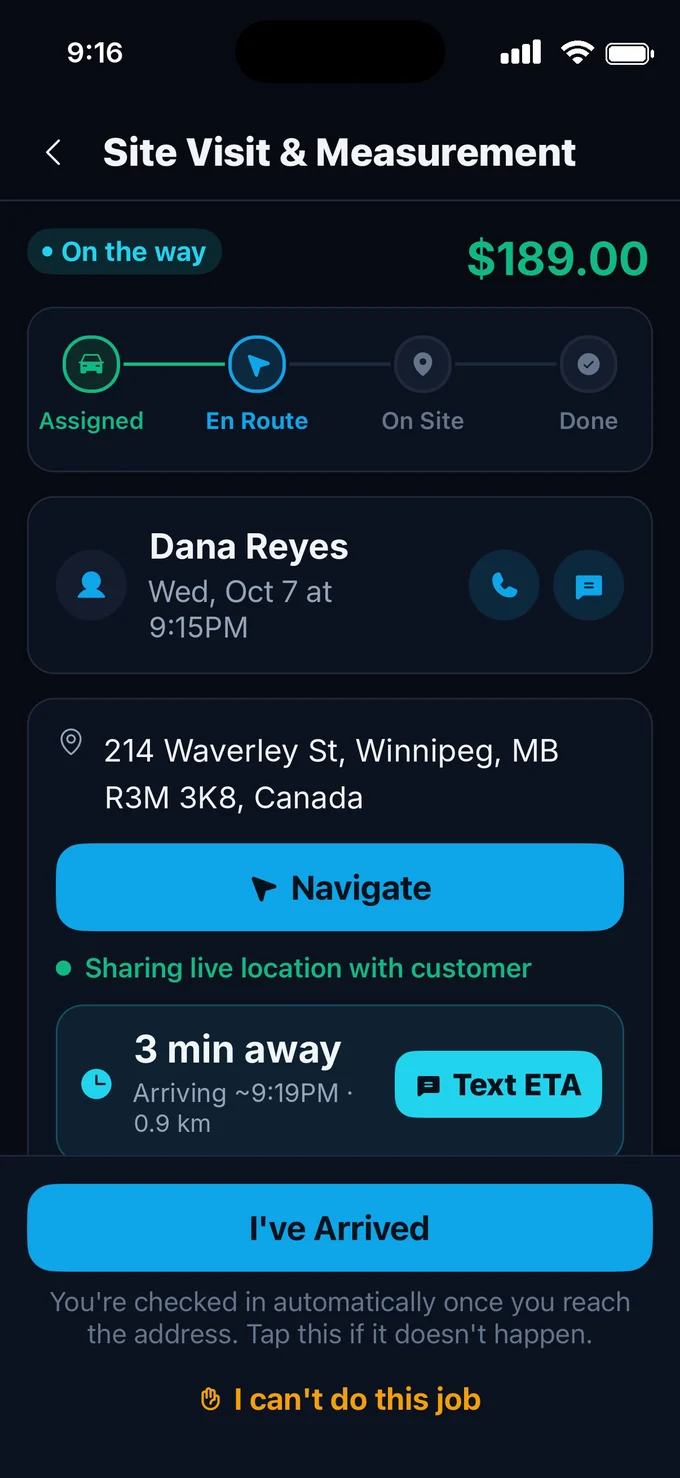
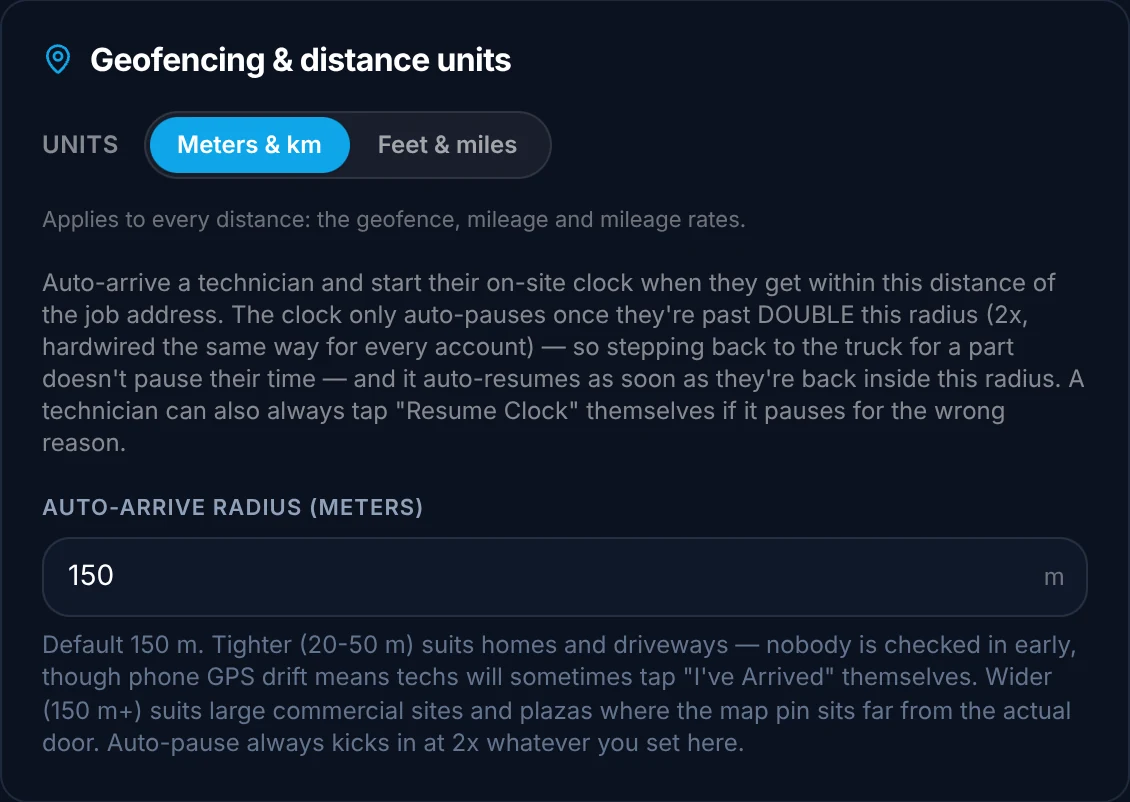
When should you stay with Housecall Pro?
Housecall Pro remains a good fit if:
- Marketing tools, online booking and payments matter more than dispatch
- You want vehicle data such as location history from a device in each van
- The office map from Essentials' phone GPS is enough and customers don't need a live link
- Your team already knows it well
Sources
Competitor details are from each company's public website, checked November 1, 2026. Features and prices change; check the source before deciding. Tell us at [email protected] if anything here is out of date.
- Housecall Pro pricing
- Housecall Pro vehicle GPS tracking
- Jobber pricing
- Jobber GPS tracking
- Jobber product update: Force Fleet Tracking live tracking links in On My Way texts (Aug 21, 2025)
- Jobber help centre: Jobber and Force Fleet Tracking
- Kickserv pricing
- Workiz pricing plans
- Workiz On My Way
- ServiceTitan pricing
- ServiceTitan Fleet Pro
- Arrivy pricing
- Arrivy customer experience
Housecall Pro alternatives: FAQs
How much is Housecall Pro's GPS tracking?
Housecall Pro's vehicle GPS page describes Vehicle GPS Tracking as a paid add-on at $20 per vehicle per month, with no contract, using a device that plugs into the vehicle's OBD-II port (checked November 1, 2026). ArrivePing's tracking comes from the technician app and is included in every plan.
Does Housecall Pro track technicians without hardware?
For the office map, yes: Housecall Pro's Essentials plan lists employee GPS tracking from the technician's mobile phone, with no hardware. The customer's live-map link in the on-my-way text is described on the Vehicle GPS Tracking page, which uses a plug-in device at $20 per vehicle per month.
How much does Housecall Pro cost?
Housecall Pro's pricing page listed Basic at $59 a month billed annually or $79 monthly for one user, Essentials at $149 or $189 for five users, and Max at $299 or $329 for eight users plus $35 per additional user, with a 14-day free trial (checked November 1, 2026).
Does ArrivePing need GPS hardware in the vans?
No. Location comes from the ArrivePing app on the phone each technician already carries: the iPhone and iPad app from the App Store, or the browser for Android technicians. There are no plug-in trackers to buy, install or pay for per vehicle.
How much does ArrivePing cost?
US$49 a month includes one dispatcher and two drivers. Drivers 3 to 29 are $30 each and every driver from 30 on is $25, so a dispatcher and five drivers is $139 a month and ten drivers is $289. The 30-day free trial includes as many users as you want; your card is kept on file and nothing is charged until day 30. Cancel any time.

Dispatch your first job today.
Sign up, paste your website and the setup agent builds your workspace while you watch. Free for 30 days, then from US$49 a month.
- Sign upNo sales call and no demo to book.
- Paste your websiteThe agent builds your brand, services, catalog, job templates and customer texts.
- Invite your teamTechnicians join from a text on the phone they already carry.
Moving from another system or need a custom integration? [email protected]
Start your 30-day free trial
- As many users as you like, for the whole trial
- Card on file, $0 until day 30
- Cancel before day 30 and you're never billed
- Then from US$49 a month: 1 dispatcher + 2 drivers
No setup fee, no contract, no GPS hardware.